
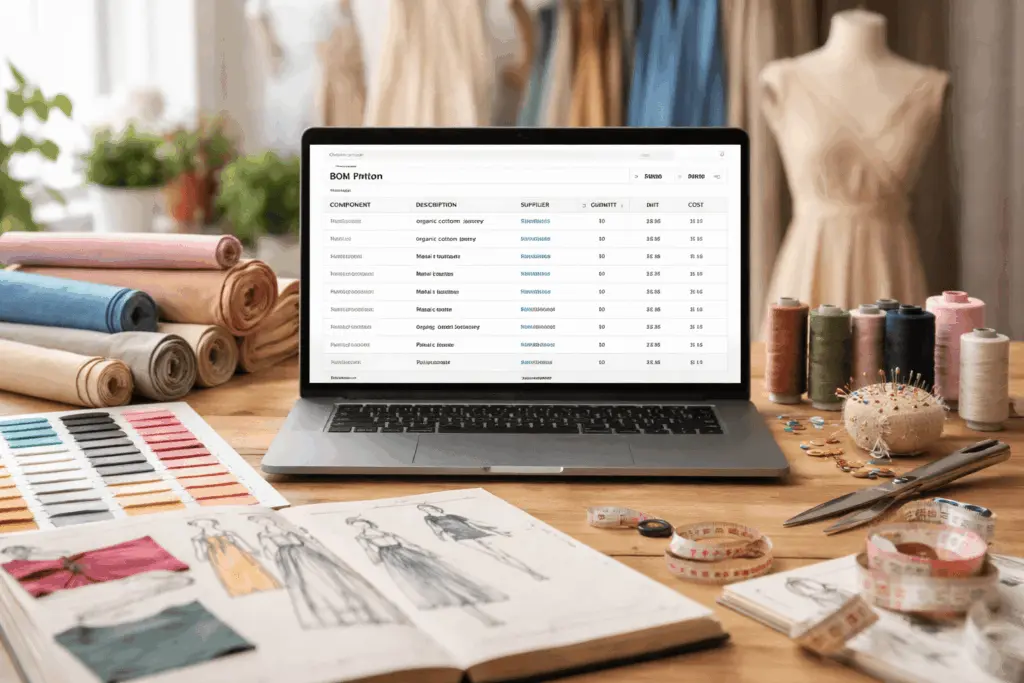
Fashion production looks simple from the outside. A designer sketches a garment. A factory produces it. The product appears in stores.
In reality, production involves hundreds of small decisions. Teams must manage fabrics, trims, labels, packaging, and many other materials. Each component must appear in the correct quantity and arrive at the right time.
That is where a bom table becomes essential.
A bom table improves efficiency by streamlining the management of production data and helping teams coordinate workflows more effectively.
A bom table helps teams organize the entire bill of materials for a product. It shows every bom item required to create a finished garment. Developers, sourcing teams, and factories all refer to this table during production.
Think of it as a roadmap for assembly. The table lists materials, defines quantity, and connects each bom item to suppliers and production details.
This guide explains how a bom table works. You will also learn how fashion brands create, manage, and improve their bill of materials table.
What Is a BOM Table?
A bom table is a structured table that lists every component required to manufacture a product.
In fashion production, the bill of materials table includes all materials and components used in the garment assembly.
Typical materials include:
- Fabric
- Buttons
- Zippers
- Sewing thread
- Labels
- Packaging
Bulk items such as adhesives, paint, or other consumables are also included in the BOM to ensure all necessary materials are accounted for.
Each bom item appears as a row in the table. The columns store important data such as quantity, supplier, and cost.
The bom header usually sits at the top of the document. This header contains basic data such as product name, style number, project reference, and creation date.
Below the bom header, teams list each bom item that belongs to the product assembly.
Simple BOM table example
| Item Number | Component | Description | Quantity | Unit | Supplier |
|---|---|---|---|---|---|
| 001 | Fabric | Organic Cotton Jersey | 1.8 | meters | Supplier A |
| 002 | Trim | Metal Button | 5 | pieces | Supplier B |
This simple example shows how a bill of materials table organizes production data.
Every bom item becomes visible in one place. Teams can review materials quickly and avoid production mistakes.
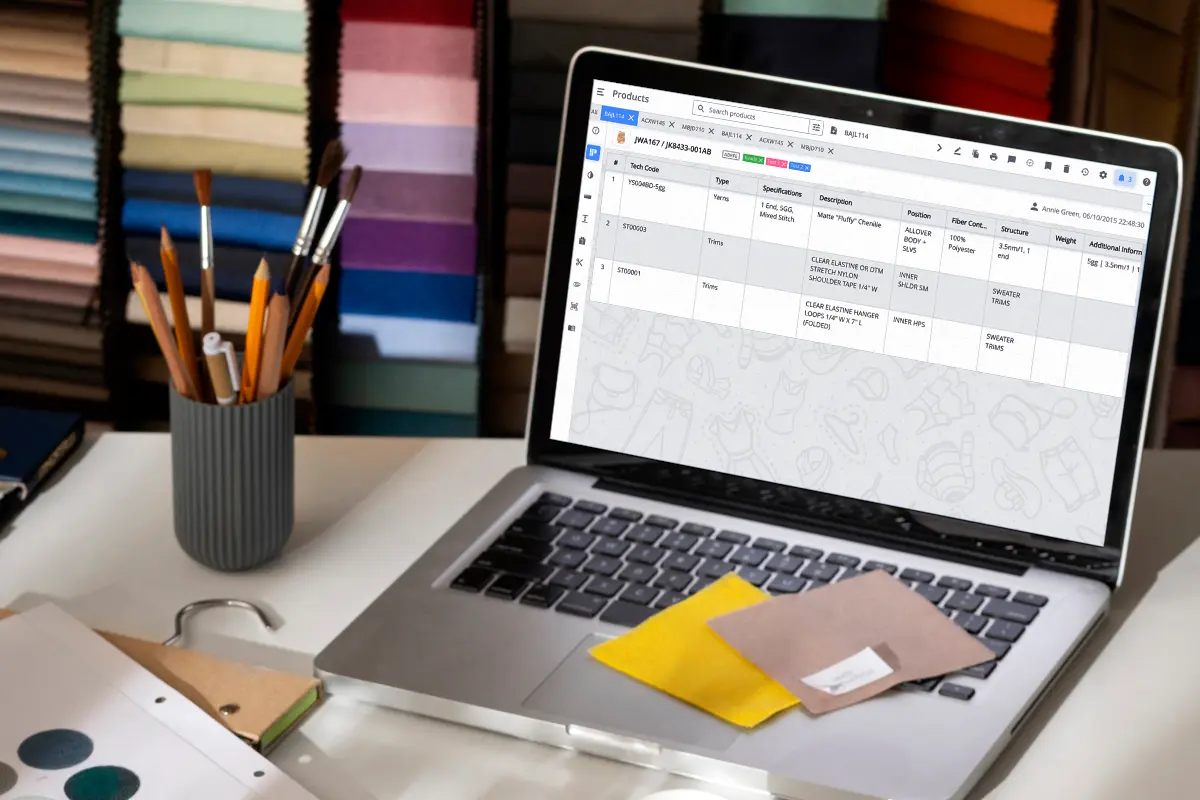
Why Fashion Brands Use a Bill of Materials Table
Fashion brands develop many products each season. Every product requires different materials and assembly components.
Without structure, production teams lose track of materials quickly.
A bill of materials table solves this challenge.
The table creates a clear register of all bom items required to manufacture a product. It connects materials with suppliers, quantities, and production data.
Key benefits of a BOM table
| Benefit | Explanation |
| Visibility | Teams see all materials and components required for assembly |
| Cost control | Merchandisers review quantity and price for every bom item |
| Supplier coordination | Teams link materials to vendors and track sourcing data |
| Production planning | Factories know exactly which components they must prepare |
| Collaboration | Designers and sourcing teams share the same reference table |
Because the entire bom appears in one table, teams can identify issues early.
For example, purchasing teams can review quantity values before production begins. This prevents shortages and reduces waste.
A well‑structured bill of materials also supports sales forecasting and manufacturing planning.
Key Columns in a BOM Material Table
Every bom table uses columns to organize product data.
Each column stores a specific property related to the bom item. In most BOM tools, such as Onshape, there is a default set of properties as columns, but you can add or remove columns to customize the BOM table and include additional properties as needed. In some software, you can also save sort settings for BOM tables, making it easier to maintain your preferred views for future use.
Below is a typical structure used in fashion production.
| Item Number | Material Type | Description | Quantity | Unit | Supplier | Cost |
|---|---|---|---|---|---|---|
| 001 | Fabric | Organic Cotton Jersey | 1.8 | meters | Supplier A | $5.20 |
| 002 | Trim | Metal Button | 5 | pieces | Supplier B | $0.20 |
Let us break down the most common columns found in a bill of materials table.
Item number
The item numbers column identifies each bom item.
Teams use item numbers to track components across the production workflow. These numbers also appear in assembly instructions and factory documents.
Material type
Material type defines the category of the bom item.
Examples include fabric, trim, packaging, and labels.
This category helps teams filter materials in large bom templates.
Description
The description column provides detailed information about the component.
Clear description text prevents sourcing mistakes. For example, “cotton jersey 180gsm” gives more clarity than simply writing “cotton fabric”.
Quantity
Quantity tells factories how much material they must use for one product.
Accurate quantity values support cost calculations and production planning.
Supplier
The supplier column connects each bom item with a vendor.
Sourcing teams use this data to contact suppliers and manage purchasing transactions.
Cost
Cost reflects the price of the material.
Merchandisers multiply quantity by cost to estimate the total bill of materials value.
BOM Table vs Tech Pack
Many professionals confuse a bom table with a tech pack.
Both documents support product development. However, they serve different purposes.
The bom table focuses on materials and components. The tech pack contains full production instructions.
| Feature | BOM Table | Tech Pack |
| Focus | Materials and components | Construction and design specifications |
| Data | Quantity, suppliers, cost | Measurements, sketches, sewing details |
| Users | Sourcing and production teams | Designers and factories |
| Role | Material planning | Product documentation |
In most companies, the bill of materials appears as a section inside the tech pack.
The bom table defines materials. The tech pack explains how to assemble those materials into the finished product.
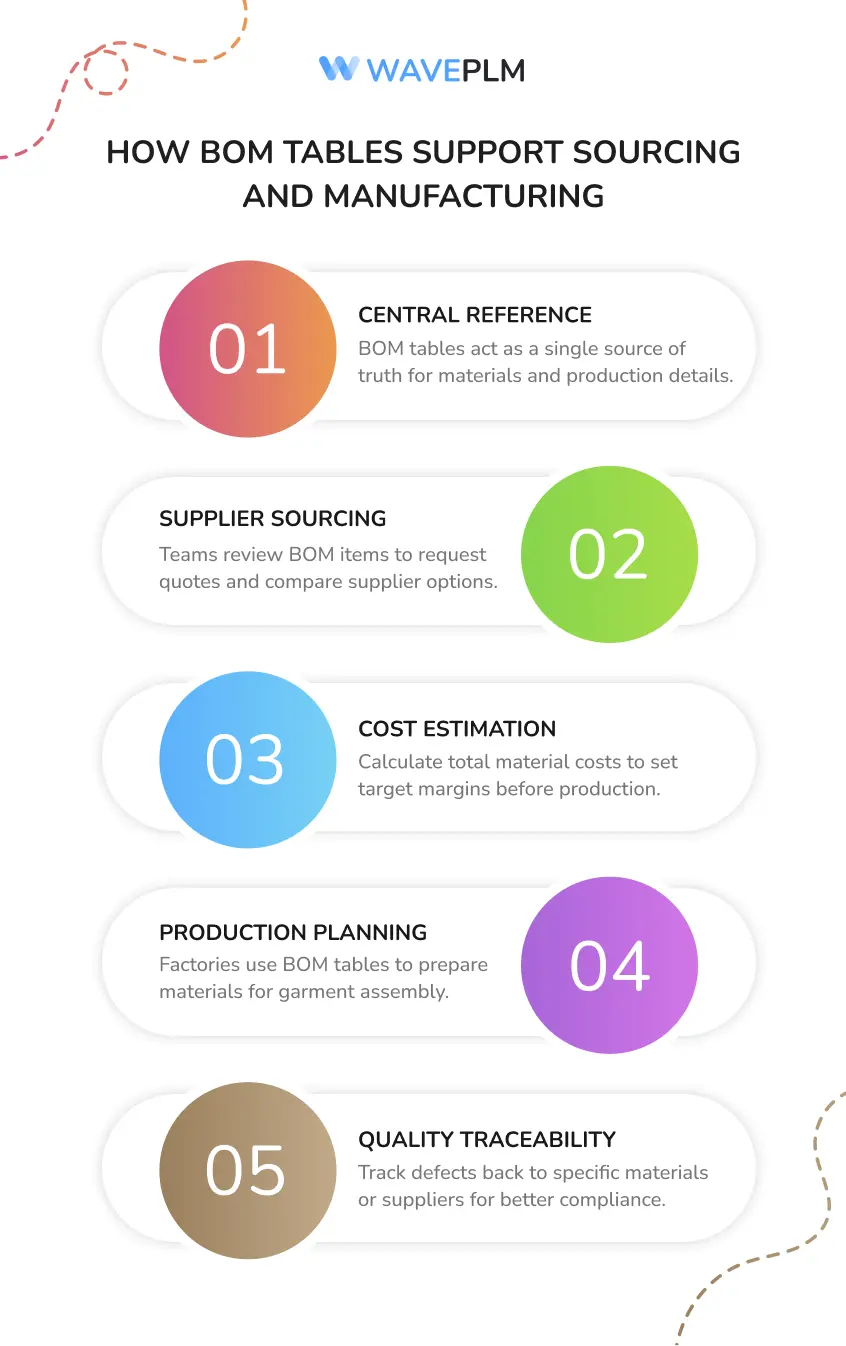
How BOM Tables Support Sourcing and Manufacturing
A bom table supports multiple teams during product development.
It acts as a central reference for materials, suppliers, and production details. Real-time updates to BOMs ensure that all stakeholders have the most accurate design and BOM data on their devices.
BOM tables streamline sourcing and manufacturing by providing a single source of truth for all parts and assemblies. BOMs are essential in mechanical design for tracking components, estimating costs, managing the supply chain, and facilitating collaboration.
All changes and updates to the BOM are recorded for traceability and future reference.
Sourcing decisions
Sourcing teams review the bill of materials table to identify suppliers for each bom item.
They request price quotes and compare vendor options.
Cost estimation
Merchandisers calculate the total bill of materials cost using quantity and unit price.
This helps brands set target margins before production begins.
Production preparation
Factories refer to the bom table during manufacturing planning.
The table shows which materials they must prepare for the garment assembly.
Quality control
The bill of materials also supports inspection processes.
If a defect appears in production, teams can trace the issue back to a specific bom item or supplier.
This traceability improves product quality and compliance.
Common BOM Table Mistakes
Even experienced teams make mistakes when managing bom templates.
Poor structure or missing data can create serious production problems. Unclear usage status or categorization of BOM items can also lead to confusion about how items are used within the system.
Missing material details
A bom item with vague description causes sourcing confusion.
Suppliers need clear details such as material composition, finish, or color.
Incorrect quantity values
Small quantity errors often stop production lines.
If the quantity of buttons is wrong, factories cannot finish the garment assembly.
Duplicate rows
Spreadsheet editing often creates duplicate bom item rows.
These duplicates distort cost calculations.
Weak version control
Multiple file versions create confusion between teams.
Some bom tables become read only while other versions continue editing.
PLM systems solve this problem with centralized data management.
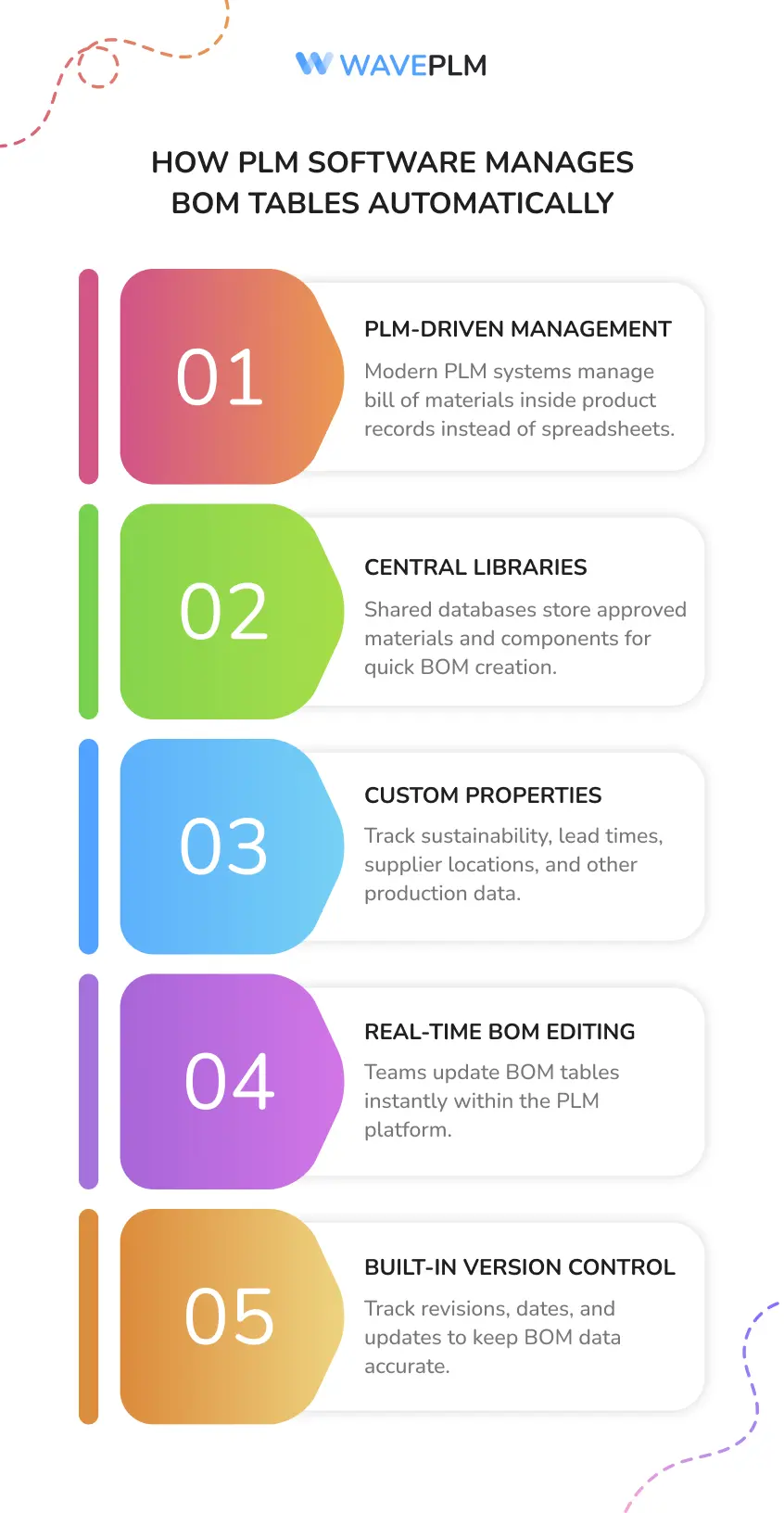
How PLM Software Manages BOM Tables Automatically
Modern companies rarely manage bom templates in spreadsheets.
Instead, they use Product Lifecycle Management software.
A Wave PLM system stores the bill of materials inside a product record. Every bom item connects to the product assembly automatically.
Central material libraries
PLM systems store approved materials and components in a shared database.
Teams can create bom items by selecting materials from the library.
Custom properties
PLM platforms allow teams to define custom properties for materials.
These properties may include sustainability certification, lead time, supplier plant location, or category.
Custom properties help teams track advanced production data.
Real‑time editing
Teams update the bom table directly inside the system.
Some platforms allow users to double click a cell to edit property values instantly.
Version control
Every change in the bill of materials receives a revision status. Every change in the BOM must be tracked with a revision ID, date, and reason to ensure the latest version is used.
The system records creation date, editor, and comment for each update.
This ensures that the entire bom always reflects the latest product data.
BOM Table Template Example
Many teams start by using simple bom templates.
Below is a basic template structure used in fashion development.
| Item Number | Component | Description | Quantity | Unit | Supplier | Comment |
|---|---|---|---|---|---|---|
| 001 | Fabric | |||||
| 002 | Trim | |||||
| 003 | Label | |||||
| 004 | Packaging | |||||
| 005 | Paint | Non-geometric finishing material |
This structure allows teams to create a bill of materials quickly. Including non-geometric items like paint in the BOM table helps capture all materials used in the product, not just physical parts, and enhances the realism and completeness of the BOM.
As projects grow more complex, companies expand the table with additional columns such as:
- part numbers
- item numbers
- material category
- plant location
- status
- custom property fields
These fields allow the bom table to reflect the full product assembly structure.
Conclusion
Fashion production requires accurate material planning.
A bom table provides the structure needed to manage that complexity.
The bill of materials table lists every bom item required to manufacture a garment. It organizes materials, components, suppliers, and quantity values in one clear table.
Because the entire bom appears in one location, teams can review materials, control costs, and coordinate production efficiently.
Modern PLM systems improve this process even further. They centralize bom data, automate updates, and allow teams to manage the bill of materials in real time.
For fashion brands, a well‑structured bom table becomes the foundation of efficient product development and production.





Leave a Reply