

Fashion PLM — product lifecycle management built specifically for apparel and accessories — sits at the center of how modern brands take a concept from sketch to store shelf. It’s the operational backbone connecting design, sourcing, production management, and quality control into a single, coherent workflow. Without it, teams are patching together spreadsheets, email chains, and disconnected tools that slow everything down and create costly errors.
The numbers back this up. Brands that centralize product development in a dedicated PLM platform routinely cut time-to-market and reduce sampling costs—two of the biggest drains on margin in a fast-moving industry. Wave PLM stands that modern fashion PLM solutions that are designed to manage the full complexity of seasonal collections, multi-tier supplier networks, and compliance requirements simultaneously.
Effective production management requires more than tracking milestones. It demands real-time visibility into materials, tech packs, approvals, and shipment preparation—all in one place. That’s where purpose-built platforms like cloud-based fashion software have a clear advantage over generic project management tools.
However, PLM alone isn’t enough. Operations teams increasingly need their product data connected to digital assets—photos, CADs, spec sheets—and to outbound logistics control. Those aren’t nice-to-haves anymore. They’re table stakes for brands operating at scale, and they’re exactly where the next layer of capability becomes critical.
Integrating digital asset management in Fashion PLM
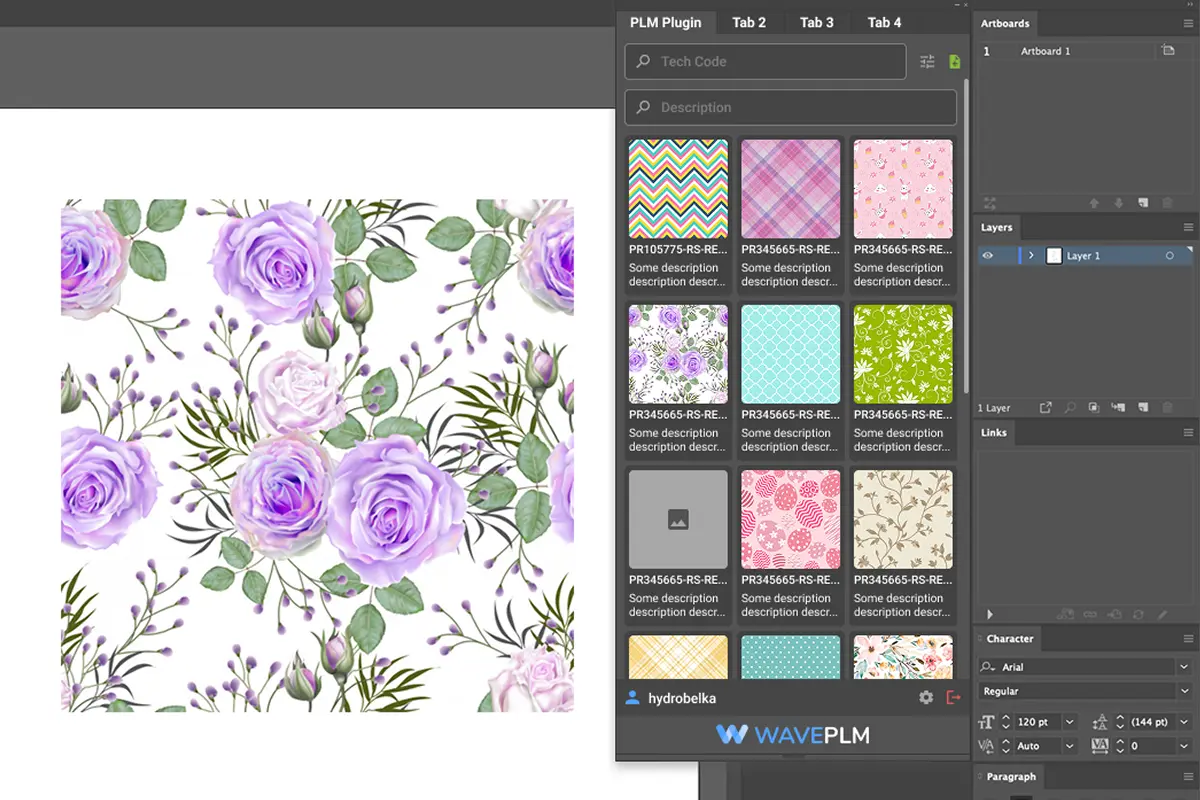
Digital asset management within a fashion PLM environment isn’t just about storing images—it’s about making every visual asset, tech pack component, and design file instantly accessible to the right person at the right stage of development.
In practice, fashion teams generate an enormous volume of assets: colorway renders, fabric swatches, CAD files, trim photos, and campaign imagery. Without a centralized DAM system inside the PLM, those assets live in scattered folders, email chains, and local drives. The result? Designers reference outdated colorways, merchandisers approve the wrong sample photos, and sourcing teams work from stale specs. According to research on DAM adoption in apparel, managing digital assets effectively is one of the most persistent operational challenges facing fashion brands today.
Version control is where integrated DAM really earns its place. When assets live directly inside the PLM—tied to specific products, seasons, and approval workflows—every stakeholder sees the current version automatically. No guessing whether “Finalv3REVISEDUSETHIS” is actually final. Changes are timestamped, traceable, and linked to the spec record itself. That single source of truth matters enormously when you’re managing hundreds of SKUs across multiple factories. You can learn more about how this connects to keeping specs accurate across teams throughout the development cycle.
The downstream benefits are real. Cleaner asset management reduces revision cycles, tightens communication with vendors, and accelerates time-to-market—all of which set the stage for tighter control over what happens next: getting finished goods out the door on time.
Shipment control Features in Fashion PLM
Once design and development assets are locked down in an integrated DAM PLM environment, the operational pressure shifts to getting the right product to the right place on time. That’s where shipment control becomes a make-or-break capability—and where a lot of brands discover their existing tools fall short.
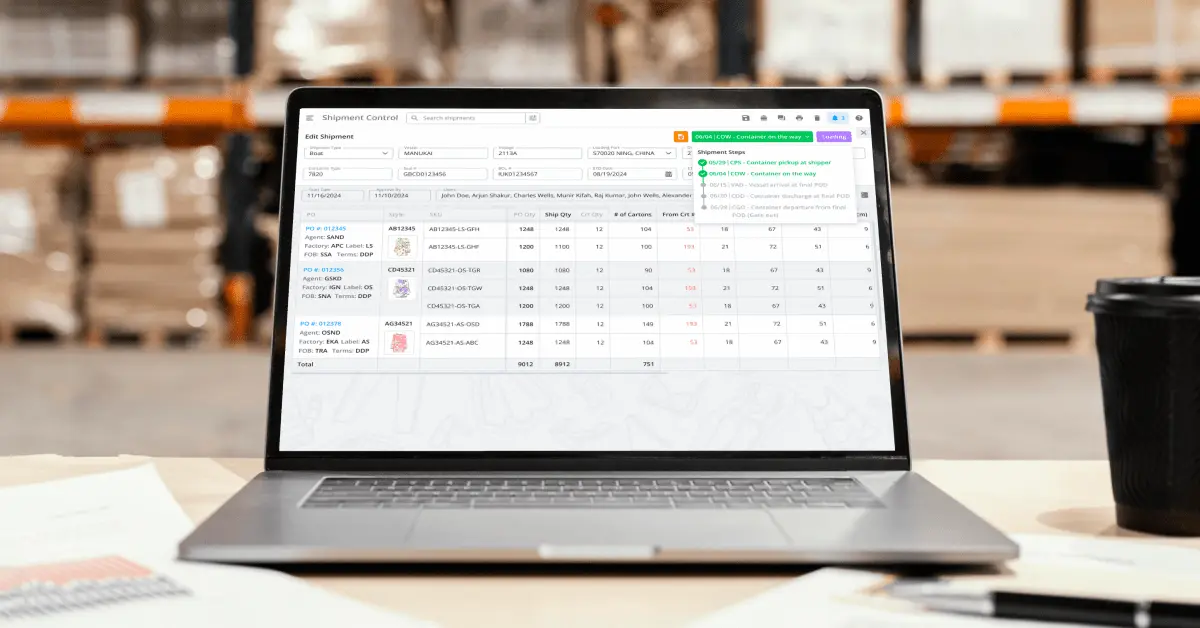
Shipment control within a fashion PLM isn’t just a tracking dashboard bolted on as an afterthought. It’s a connected layer that links production milestones, vendor confirmations, and delivery timelines directly to the product records your team is already working in. When a factory submits a shipment scheduling, that event should automatically update the corresponding purchase orders, trigger quality checkpoints, and flag any delays against your critical path calendar.
Centralized storage of shipment information matters just as much as centralized storage of design assets. In practice, when booking details, packing lists, carton measurements, and freight documentation all live in one system, operations teams stop chasing emails and start making proactive decisions. A common pattern is that brands managing these details across spreadsheets and disconnected inboxes absorb avoidable landed cost overruns because nobody caught a weight discrepancy until the freight bill arrived.
Key shipment control features worth evaluating in any PLM platform include:
- Carton and packing list management tied directly to purchase orders
- Size-run and quantity reconciliation at the SKU level
- Booking and vessel tracking with milestone alerts
- Real-time visibility into ex-factory versus delivery dates
Intelligent automation is increasingly being applied to flag shipment anomalies before they cascade into larger supply chain disruptions—making this an area where platform capability gaps have real financial consequences.
Understanding which platforms actually deliver on these capabilities versus which ones simply list them as features is the natural next question—and that comparison deserves a closer look.
Comparison: Standalone Tools vs. Integrated PLM Systems
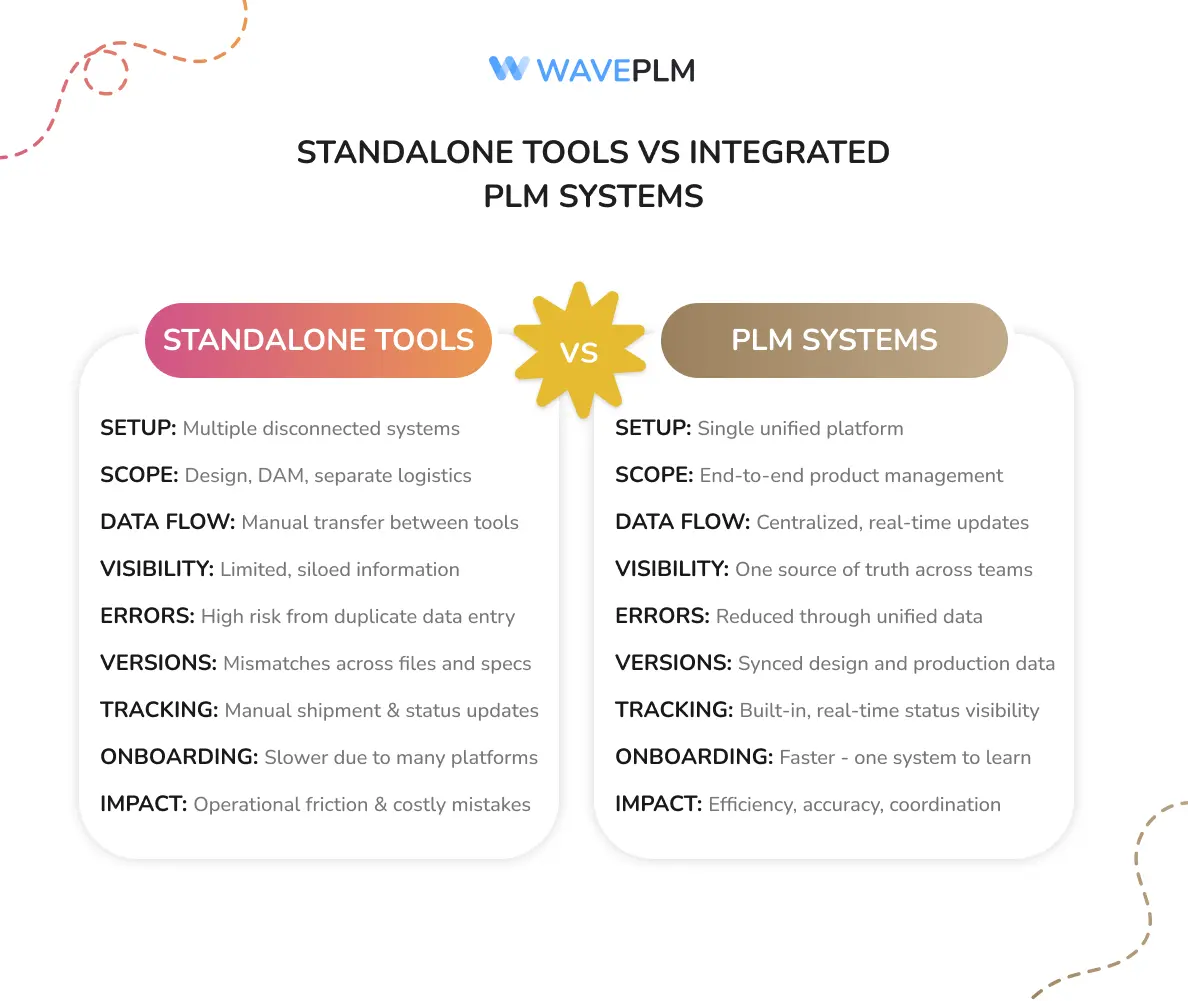
When teams piece together separate tools for design, asset storage, and shipment control, the friction adds up fast. A standalone DAM handles images well enough—until someone needs to cross-reference a colorway with an open purchase order. A separate logistics tool tracks cartons, but it can’t tell you whether the corresponding tech pack has been approved. That gap between systems is where costly mistakes live.
Integrated PLM systems eliminate that gap by design. Rather than exporting files between platforms and manually reconciling version histories, every stakeholder—from merchandising to the warehouse—works within a single source of truth. In practice, this means a design revision automatically flags downstream production documents, and a delayed shipment surfaces immediately within the same environment where the product specs live.
Consider the operational overhead of standalone tools:
- Duplicate data entry across systems increases error rates
- Version mismatches between design files and production specs slow approvals
- Disconnected shipment tracking forces manual status updates across teams
- Longer onboarding cycles as new hires learn multiple platforms
Integrated systems aren’t without tradeoffs—migration from legacy tools requires upfront investment in time and training. However, for operations teams managing high SKU counts and global vendor networks, the consolidated visibility typically justifies the transition. Understanding what modern PLM can actually do is often the first step toward making that case internally. That visibility benefit is exactly what the next section breaks down in detail.
How Operations Teams Benefit from Integrated PLM
The efficiency gains from a unified PLM environment don’t land equally across every department—but operations teams tend to see the most immediate, measurable impact. When design assets, tech packs, material specs, and shipment information all live in one connected system, the daily friction that slows production cycles down starts to disappear.
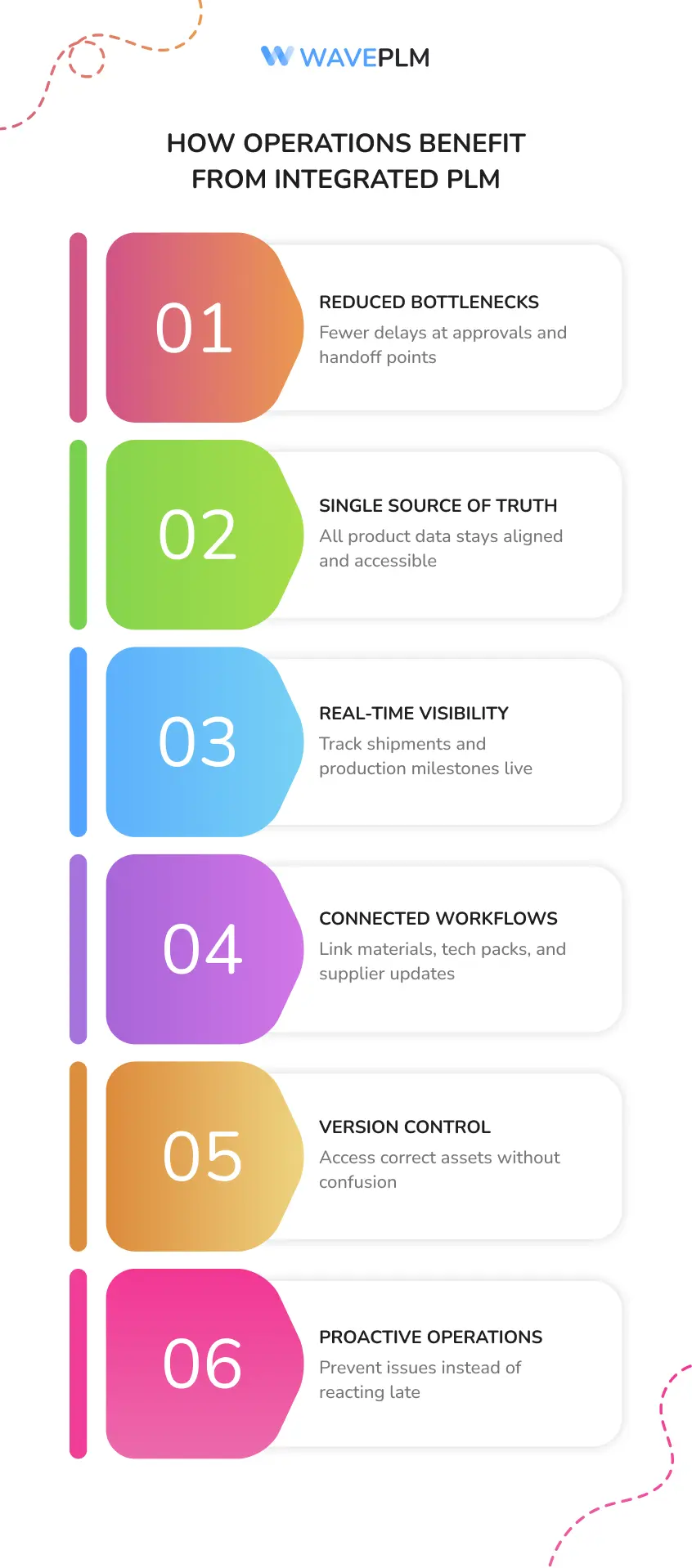
In practice, what this means is fewer bottlenecks at critical handoff points. A common pattern is that operations teams spend a disproportionate amount of time chasing approvals, reconciling mismatched spec versions, or waiting on updated assets from creative. Industry research consistently shows that disconnected workflows are the primary driver of late-stage production errors—the expensive kind.
Integrated PLM addresses this directly by giving operations a single source of truth. Consider what that looks like in practice:
- Shipment readiness is visible against live production milestones, not buried in spreadsheets
- Material approvals link directly to tech packs, reducing back-and-forth with suppliers
- Asset versions are locked and accessible without hunting through shared drives
One practical approach is building material workflows that connect sourcing decisions to shipment planning early—something a well-structured materials library within PLM makes significantly easier.
Integrated PLM turns operations from a reactive function into a proactive one—giving teams the visibility to prevent delays rather than just respond to them. That proactive capability becomes even more pronounced when organizations think carefully about how implementation is structured from day one.
Technical Deep Dive: Implementing PLM in Your Organization
Rolling out apparel PLM isn’t a plug-and-play exercise—but it doesn’t have to be a years-long IT project either. The implementation approach matters as much as the platform itself. Teams that see the fastest results typically follow a phased model: start with the product development core (tech packs, BOM, materials library), then layer in DAM connectivity, and finally integrate shipment control and logistics workflows once foundational data is clean and consistent.
Data migration is usually where timelines slip. In practice, most brands underestimate how much legacy asset cleanup is required before a DAM integration can function properly. Inconsistent naming conventions, orphaned files, and duplicate colorways all need resolution before the system can reliably link assets to the right SKUs and purchase orders.
Integrated PLM is only as strong as the data architecture supporting it. That’s worth repeating before any rollout conversation begins.
A few practical steps that tend to accelerate adoption:
- Map your critical path first — identify the handoffs between design, sourcing, and logistics where delays actually cost money
- Establish naming and taxonomy standards before migration, not after
- Train by role, not by feature — operations staff need different workflows than designers
For teams navigating the rollout process, a structured approach to PLM adoption can reduce go-live friction significantly. Of course, implementation isn’t without its challenges, and it’s worth being clear-eyed about where things can go sideways.
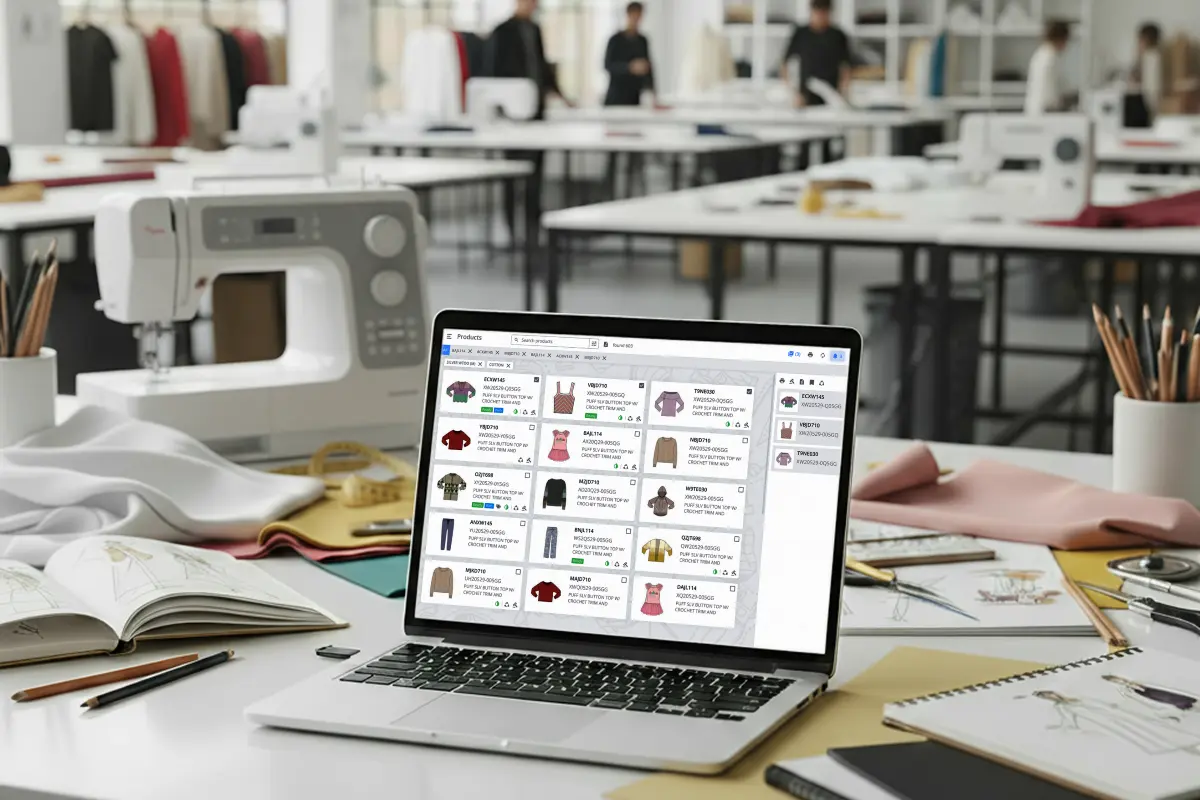
Limitations and Considerations
No Product Lifecycle Management solution is a silver bullet—and it’s worth being honest about that before you commit to a platform or implementation plan.
Integration complexity is real. Even well-designed systems require careful mapping of existing workflows before go-live. Teams carrying years of data spread across spreadsheets, email threads, and disconnected tools will face a data migration challenge that demands dedicated time and internal ownership. Rushing this phase is one of the most common reasons rollouts underperform.
Adoption takes intentional effort. A platform is only as effective as the people using it consistently. Design and merchandising teams accustomed to working in standalone tools may push back on workflow changes—even when those changes ultimately save them time. Change management isn’t a nice-to-have; it’s part of the project.
There are also cost and scope considerations worth evaluating honestly. Depending on team size and feature requirements, licensing and onboarding costs vary meaningfully. Reviewing transparent pricing structures upfront helps set realistic budget expectations before scoping begins.
Finally, no system eliminates all coordination overhead. Integrated DAM and shipment tracking reduce friction significantly, but supplier relationships, carrier variability, and real-world production delays still require human judgment.
The goal isn’t a perfect, fully automated operation—it’s a smarter foundation. Understanding these limitations helps teams set the right expectations and get more value out of the platform faster. With those trade-offs in mind, there are still plenty of questions that come up when teams first explore fashion PLM—which is exactly what we’ll address next.
Frequently Asked Questions About Fashion PLM
What’s the difference between PLM and digital asset management software?
PLM manages the entire product development process—specs, BOMs, approvals, and supplier communication. digital asset management software handles the storage, organization, and distribution of digital assets like tech pack images, fabric swatches, and campaign photography. In practice, the most effective fashion operations platforms bring both together, so assets are searchable within the product record rather than siloed in a separate system.
Does PLM replace our existing ERP?
Not typically. PLM and ERP serve different functions. PLM governs the creation and development phase; ERP handles financials, procurement, and post-production operations. A well-integrated stack connects the two so product data flows downstream without manual re-entry.
How long does PLM implementation actually take?
It depends heavily on team size and data complexity. Smaller brands with clean data can be operational in weeks. Larger operations with legacy systems and complex supplier networks should plan for several months of phased rollout—as covered in the implementation section above.
Can PLM handle carton management and shipment tracking?
The best platforms do. Shipment control features—including carton packing, booking management, and logistics tracking—are increasingly standard in modern apparel PLM tools built specifically for operations teams.
Is cloud-based PLM secure enough for supplier collaboration?
Generally, yes. Role-based permissions and encrypted data transfer are table stakes for reputable cloud PLM vendors. The key questions are how granular those permissions get and whether audit trails capture every change—details worth verifying before you sign.
Those answers cover the most common sticking points, but the real clarity comes from consolidating what you’ve learned into a clear action framework—which is exactly what we’ll wrap up with next.
Key Takeaways
Operations teams don’t need more tools—they need fewer, better-connected ones. A unified fashion PLM platform that brings together material tracking, digital asset management, and shipment control isn’t a luxury for enterprise brands. It’s quickly becoming the baseline expectation for any team trying to move product from concept to customer without losing time, specs, or sanity along the way.
Here’s what the evidence points to, clearly:
- Integration beats isolation. Disconnected systems create version chaos, approval delays, and costly sampling errors. PLM platforms that unify DAM and logistics data eliminate the gaps where mistakes hide.
- Material tracking is a strategic function. When fabric statuses, supplier lead times, and compliance certifications live inside the same system as your tech packs, decisions get faster and smarter.
- Shipment and carton-level visibility is a competitive edge. Operations teams that can trace units from factory floor to fulfillment center catch problems before they become chargebacks or stockouts.
- AI is already reshaping what’s possible. Automation in forecasting and spec generation is moving from pilot programs to standard practice.
A unified PLM system isn’t just about efficiency—it’s about giving operations teams the control they’ve always deserved.
Whether you’re running a footwear line or a multi-category apparel brand, the right platform for your team should handle complexity without creating it. Start with clarity about your integration needs, involve your operations team early, and choose a solution built for how fashion actually works—not how software vendors wish it did.





Leave a Reply