

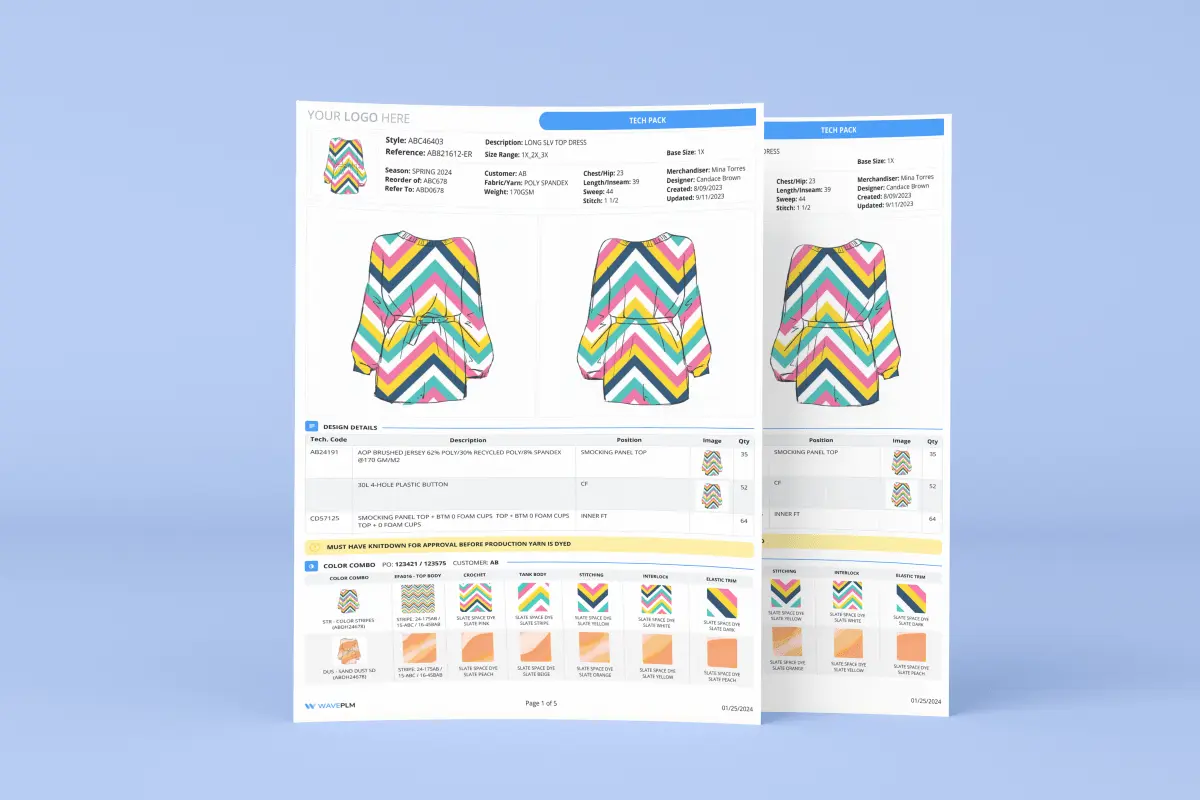
Tech pack version control is the practice of tracking every change made to a technical specification document. It records who changed what, when, and why — so factories always build from the correct, approved version. In most apparel brands, however, this process breaks down quickly. Files named techpack_FINAL_v3_revised_USE-THIS-ONE.pdf pile up in shared folders. Factories build samples from the wrong revision. Teams spend weeks resolving errors that a simple version system would have prevented. This guide explains how to build a reliable tech pack version control process — and why purpose-built PLM solves it fundamentally differently from folders and spreadsheets.
What Is Tech Pack Version Control?
Tech pack version control is a method for managing revisions to a garment’s technical package throughout the product development process. It assigns a clear version identifier to every iteration — for example, v1.0, v1.1, v2.0. Each version records the reason for the change, the person who made it, and the date it was approved.
A well-controlled tech pack history includes the original design brief. It also captures each round of fit sample feedback, material substitutions, grading corrections, and factory comments. Furthermore, it tracks the approval status of each version — whether a revision is a draft, under review, or factory-approved. Without that chain of custody, it is impossible to tell which version drove a given sample. Consequently, root-cause analysis after a quality failure becomes guesswork.
Our finding: Wave PLM customers report that once a structured version control workflow is in place, the average number of tech pack revision rounds per style drops from 4+ to under 2. The primary reason: factories stop building samples on outdated specs.
Why Do Tech Pack Revisions Spiral Out of Control?
Most brands underestimate how quickly tech pack revisions multiply. A single style in a seasonal collection might touch 6–8 team members — designer, technical designer, merchandiser, sourcing manager, factory technician, and QC lead. Additionally, each of them may request changes at different stages. Late-stage decisions also add complexity. Colorway additions, trim substitutions, or retailer-specific labeling requirements can trigger cascading edits across the entire spec.
The core problem is that email and shared drives provide no native version structure. Consequently, teams develop their own ad hoc naming conventions. These conventions break the moment a new team member joins or a file gets moved. Factories receive attachments from multiple senders and cannot tell which PDF supersedes which. In contrast, brands with a formal versioning system reduce factory queries about spec currency significantly — because the factory has a single source of truth.
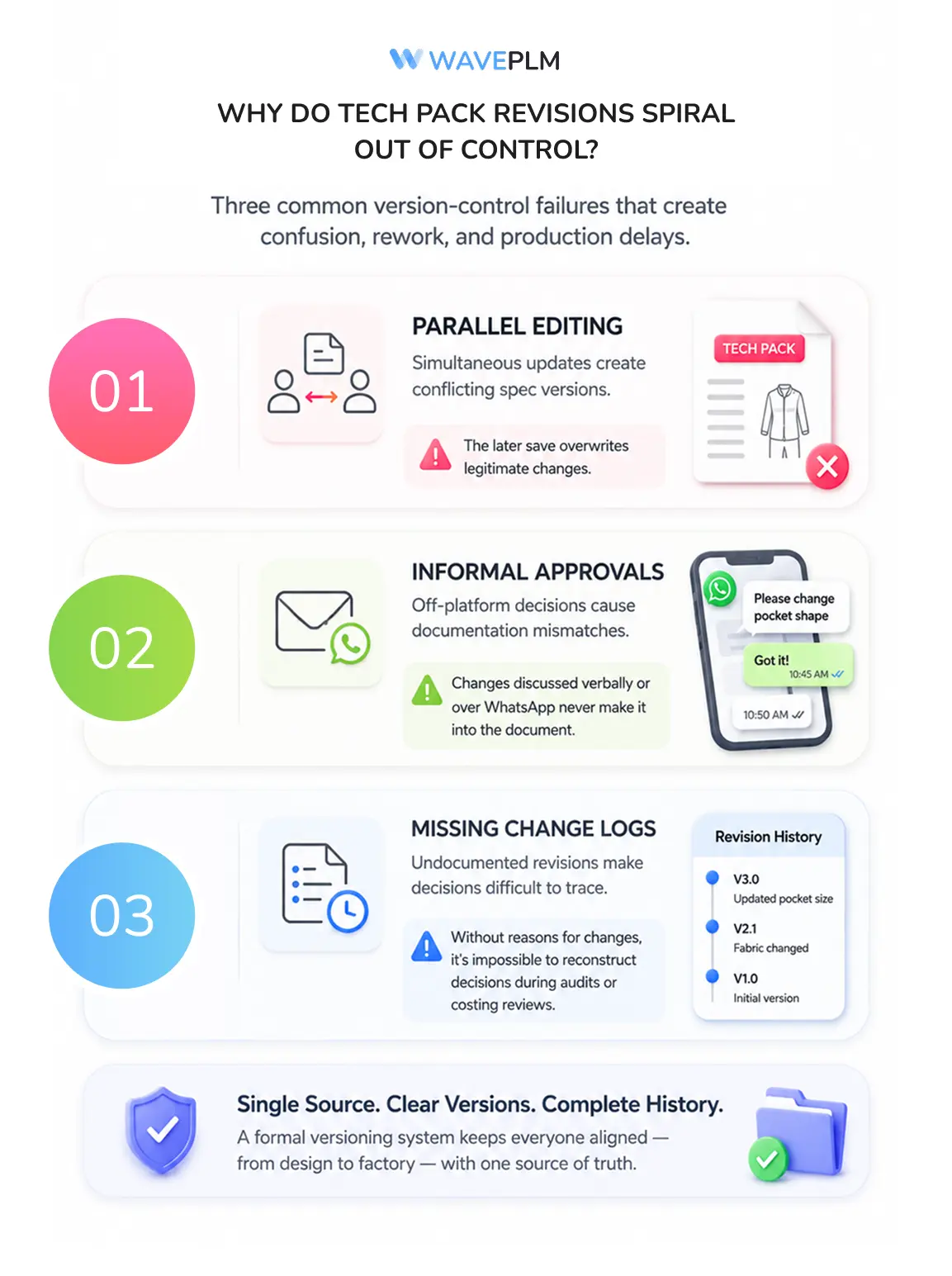
Three patterns consistently cause version chaos in apparel brands:
- Parallel editing. Two team members update the same spec simultaneously without a lock mechanism. The later save overwrites legitimate changes.
- Informal approvals. Changes communicated verbally or over WhatsApp never make it into the document. As a result, the official PDF diverges from the actual intent.
- Missing change logs. Even brands that use version numbers often skip documenting the reason for each revision. This makes it impossible to reconstruct decisions months later during audits or costing reviews.
How Do Most Brands Manage Tech Pack Versions Today?
The majority of small and mid-size apparel brands rely on one of three approaches. None of them provides true version control. First, email chains remain the most common method. A new PDF is attached to each revision email, and team members piece together history by scrolling back through threads. Second, cloud folders like Google Drive or Dropbox add a layer of organization. However, they lack structured approval workflows or automatic change tracking. Third, some teams use spreadsheets as a manual revision log alongside the PDF, recording changes in a separate tab that must be updated by hand.
These workarounds share the same fundamental weakness: they depend entirely on individual discipline. Notably, the moment a team member sends a spec directly to a factory from their personal email — bypassing the shared folder — the version chain breaks. At that point, the factory may work from an older revision for weeks before anyone notices.
For broader context, the spec sheet management challenge is closely related. In both cases, documents divorced from a central system accumulate silent errors over time.

What Should a Proper Tech Pack Version System Include?
Effective tech pack version control rests on five components, regardless of the tool used to implement it.
1. Structured version numbering. Major revisions — those that change construction, measurements, or materials — should increment the major version number (v1 → v2). Minor corrections like annotation fixes or colorway label updates increment the minor number (v1.0 → v1.1). This distinction tells factories immediately whether they need to re-read the full spec or check one section.
2. A mandatory change log. Every new version should require a one-line description of what changed and why. For example: “v1.2 — Adjusted back rise by 0.5cm per factory fit feedback, 2026-05-14, approved by TD.” This log becomes the audit trail for costing disputes and QC investigations.
3. Approval gating. Factories should only receive versions that have cleared an internal approval step. Therefore, drafts and in-review versions should be invisible to external parties — or at minimum clearly watermarked — until sign-off is complete.
4. Factory acknowledgment tracking. Knowing that the correct version was sent is not enough. Similarly, confirming that the factory opened and acknowledged it matters. This is especially important for newly onboarded vendors, who may have different communication habits than your core factories.
5. Link to the bill of materials. Tech packs and BOMs are tightly coupled. A fabric substitution in the spec should flag the BOM for review. Version control systems that treat these as separate documents create a new class of inconsistency errors.
Industry data: According to a 2024 Centric Software survey of apparel brands, 71% of respondents cited “receiving outdated tech packs” as a top factory communication challenge — ahead of language barriers and lead time issues.
How Does PLM Handle Tech Pack Version Control?
A fashion PLM system approaches tech pack version control structurally rather than procedurally. Instead of relying on team members to follow a naming convention, PLM enforces versioning at the data level. Every change to a spec creates a new version automatically. The previous version is archived but remains accessible. Furthermore, no file can be sent to a factory without being in an approved state.
PLM also connects version history to the rest of the product record. When a technical designer bumps a tech pack to v2.0, the system can prompt a review of the linked BOM, the AQL inspection criteria, and any open factory comments from the previous revision. As a result, changes do not travel through the organization in isolation — they propagate to every dependent document and stakeholder automatically.
PLM additionally enables a supplier portal model. Factories log in to retrieve the current approved version themselves, rather than receiving attachments over email. Consequently, the “wrong version sent by accident” scenario is structurally eliminated — there is only one place to get the spec, and it is always current.
For brands using AI-assisted tech pack generation, version control becomes even more important. AI-drafted specs require several rounds of human review before they are factory-ready. A clear version chain ensures reviewers know exactly which iteration they are approving.
Common Tech Pack Version Control Mistakes to Avoid
Even brands that adopt a formal versioning approach frequently make the same mistakes in practice. First, many teams apply version numbers retroactively. They label old files after a confusion incident rather than from the start. Retroactive versioning is better than nothing, but it cannot be trusted as an audit trail.
Second, teams often create separate version systems for different file types. One system tracks the PDF spec, another the flat sketch, and another the graded measurement table. This fragmentation means that a v2 PDF might correspond to a v1.3 sketch, with no automated link between them. Ideally, all components of a technical package share a single version state.
Third, some brands version the tech pack but not the approval. A document marked “v3 — final” carries no information about who approved it or when. For compliance, costing reconciliation, and seasonal planning, the approval record is as important as the change record itself.
Frequently Asked Questions
What is tech pack version control in apparel?
Tech pack version control is the practice of assigning sequential identifiers to each revision of a garment’s technical specification document. It records who made each change and why, and ensures factories only access approved versions. It replaces ad hoc file naming — like “techpack_FINAL_v2” — with a structured, auditable history of every change from first draft to production approval.
How many tech pack revisions does an apparel brand typically go through?
Most small and mid-size apparel brands send 3–5 rounds of tech pack revisions per style before factory approval. Brands using informal email and Dropbox workflows tend toward the higher end. Brands using PLM or structured approval workflows typically finish in 2 rounds or fewer, because miscommunications are caught earlier in the cycle.
What is the difference between a tech pack and a BOM?
A tech pack is the full technical specification for a garment — including construction details, measurements, colorways, and artwork placements. A bill of materials (BOM) is the component inventory embedded within or linked to the tech pack, listing every material, trim, and hardware item by supplier reference and quantity. In short: the tech pack describes how to build the product; the BOM lists what to source to build it.
Can I use Google Drive or Dropbox for tech pack version control?
Google Drive and Dropbox store previous file versions automatically, but they lack approval workflows, change log requirements, and factory access controls. As a result, teams must manage naming conventions and communication protocols manually. For brands managing more than 30–40 styles per season, that manual overhead typically outweighs the cost of a dedicated PLM or product development tool.
When should a brand move from spreadsheets to PLM for tech pack management?
The practical threshold is around 20–30 active styles per season, or when a second factory or offshore vendor is added. Below that scale, disciplined spreadsheet and folder structures can work. Above it, the coordination overhead — tracking which factory has which version, managing simultaneous revisions, reconciling BOM changes — makes a dedicated system worthwhile. A structured PLM implementation typically pays back within two seasons through reduced sample rounds and rework costs.
What naming convention should I use for tech pack versions?
A reliable convention uses three elements: a style code, a version number, and a date — for example, SS26-JACKET-001_v2.1_20260514. Major version numbers (v1, v2, v3) indicate structural changes; minor numbers (v1.1, v1.2) indicate small corrections. Always include the date of the last approved edit rather than the file creation date, since files are often created days before their content is finalized.
Disorganized tech pack revisions are one of the most preventable sources of sample failures and production delays in apparel. Additionally, they are among the easiest to fix — not by asking the team to be more careful, but by putting a system in place that makes the correct behavior automatic. Whether you start with a disciplined folder structure or move directly to PLM, the goal is the same: every factory builds every sample from the same version, every time.
If you’re evaluating how PLM can bring structure to your tech pack workflows, book a Wave PLM demo to see version control in action.





Leave a Reply