
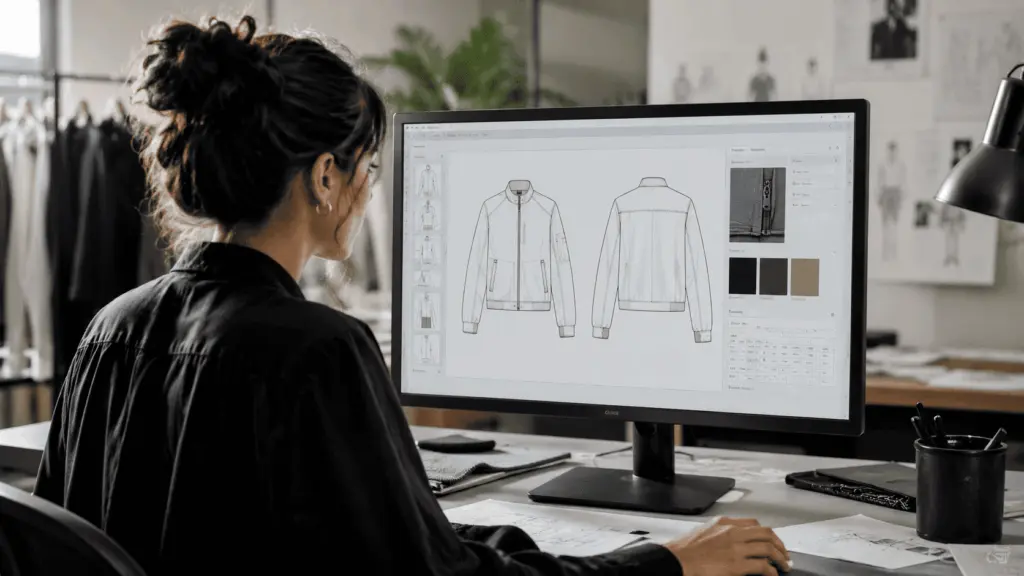
An AI tech pack tool is no longer a concept under development. It’s a feature inside PLM software and standalone apps that fashion brands actively use in 2026. Some capabilities are genuinely production-ready: auto-populating standard fields, suggesting grading increments, flagging missing measurements. Others still produce output that requires significant human correction before any factory would accept it. This guide draws the line between the two, so your team can adopt what works without getting burned by what doesn’t.
Key Takeaways
McKinsey’s State of Fashion 2025 identifies AI-assisted product development as one of the top three digital investment priorities for fashion brands globally — and AI tech pack creation is among the most immediately practical use cases (McKinsey & Company, 2025).
Early adopters report cutting AI tech pack first-draft creation time by 40–70% for reorder styles and seasonal carry-forwards, based on vendor case studies from 2024–2025.
AI can reliably handle template population, grading suggestions, version summaries, and terminology translation. However, measurement values, material callouts, and factory-specific notes still require a technical designer’s sign-off.
The most effective AI tech pack workflows connect AI-assisted generation directly to a PLM system. Treating the tech pack as a standalone PDF outside the product record creates version confusion and data duplication.
What Is an AI Tech Pack and How Does It Differ from a Traditional One?
A traditional tech pack is a document — typically 10 to 40 pages — that tells a factory everything it needs to produce a garment accurately. It includes technical drawings, measurements, material specs, construction notes, colorways, labels, and packaging requirements. Producing one from scratch takes a technical designer 4 to 20 hours, depending on complexity. For brands running 100+ styles per season, that time adds up fast.
An AI tech pack is the same document, but with AI handling a portion of the content creation. Specifically, AI tools in this space work in four ways. First, they draw on historical style data to pre-populate standard fields. Second, they analyze measurement inputs to suggest grading increments. Third, they compare document versions to generate change summaries. Finally, some also extract structured data from design files or product descriptions. As a result, a technical designer spends less time on repetitive entry and more time on construction details that require genuine expertise.
However, the term “AI-generated tech pack” is sometimes used to mean something more ambitious: a fully automated document from a sketch, with minimal human input. That capability exists in limited demos. It’s not production-ready for most brands in 2026. In contrast, the incremental AI assistance described above is working reliably and is worth adopting now. For context on where AI tech pack creation fits within the broader landscape of AI features in PLM, see our evaluation of AI features in fashion PLM that are production-ready in 2026.
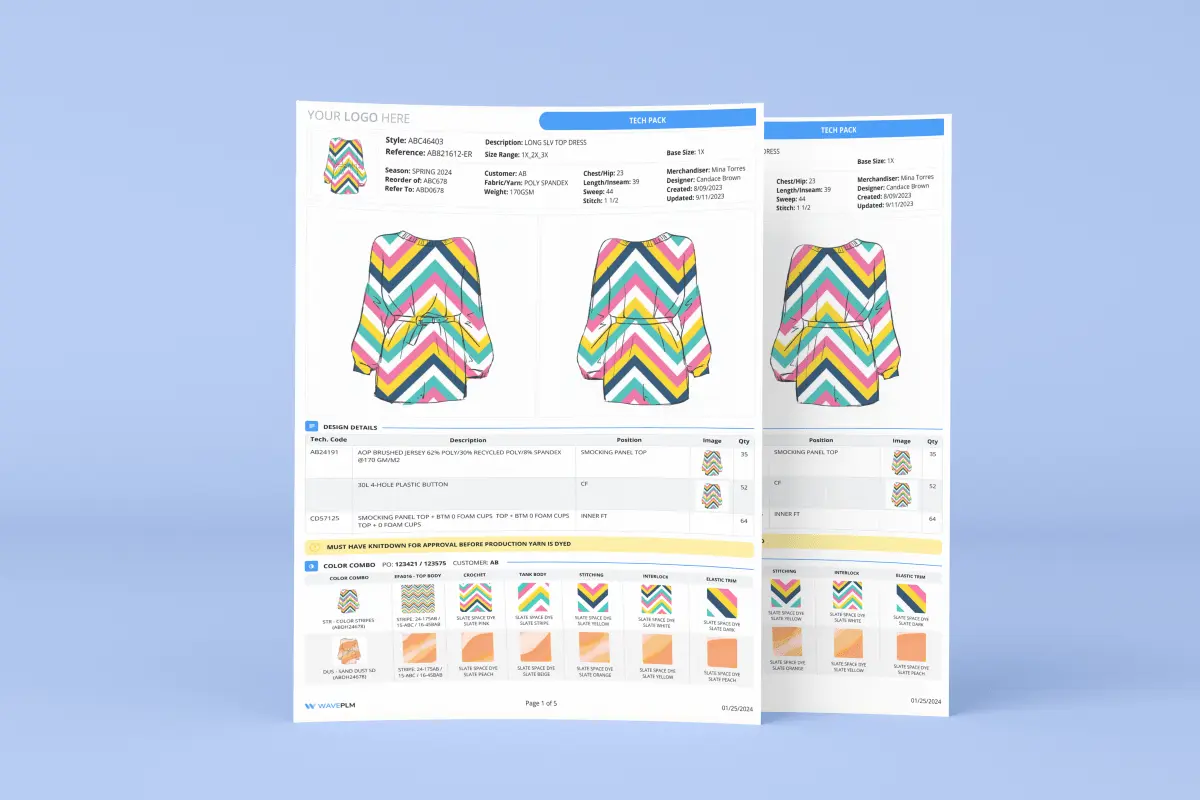
Which Parts of an AI Tech Pack Can Be Generated Automatically?
Not all sections of a tech pack are equally suited to AI automation. Specifically, the parts most amenable to AI assistance follow predictable patterns: standard fields, size progressions, repeat structures. Sections requiring original technical judgment are a different matter. As a result, the practical approach is to use AI for what it does reliably and reserve human effort for what it doesn’t.
| Tech Pack Section | AI Capability in 2026 | Human Review Required? |
|---|---|---|
| Cover page and style summary | Fully auto-populated from product record data (style name, season, colorways, fabric category) | Light review |
| Measurement chart — base size | Template provided; AI can flag empty fields and suggest values from similar past styles | Full review required — values must be accurate |
| Grading (size increments) | AI can suggest standard grading increments based on size chart and product category | Review required; custom grading rules override suggestions |
| BOM (Bill of Materials) | AI can suggest components from historical BOM data for similar styles; auto-populate supplier codes | Review required for new materials or new suppliers |
| Care label and compliance callouts | AI can auto-suggest care symbols and regulatory labels based on fiber content and destination market | Required — regulatory errors carry liability |
| Construction notes and stitching callouts | Limited — AI can suggest standard callout language but cannot originate construction decisions | Full human authoring required for new constructions |
| Technical flat sketches | AI image tools can generate reference flats from a description; not factory-standard yet | Full review or redraw required before factory submission |
| Version change summary | AI can compare document versions and generate a structured change log automatically | Light review — high reliability |
The Highest-Value Use Case: Carry-Forward Automation
In practice, the highest-value AI tech pack use case is carry-forward automation. Specifically, this means taking last season’s tech pack for a reorder style and using AI to update it for new colorways, fabric updates, and measurement revisions. The alternative — rebuilding from a blank template — wastes hours on fields that haven’t changed. Furthermore, for brands producing large volumes of similar silhouettes, AI can pre-populate a new style to 60–70% completion from the closest historical match. As a result, the technical designer focuses on what’s actually different.
Our finding: The brands that get the most out of an AI tech pack workflow are those that have already standardized their tech pack templates and historical data. AI is pattern-matching against what you’ve already done — consequently, the quality of AI suggestions scales directly with the quality and consistency of your historical style library.
What Are the Real Limitations of AI Tech Pack Tools in 2026?
Vendors presenting AI tech pack demos lead with the impressive cases: a surprisingly complete draft, or measurement suggestions that are 80% correct. Notably, they show less often where the remaining 20% fails. In a tech pack, 20% errors don’t mean 20% of garments come out wrong. They mean 100% of garments can come out wrong if a critical measurement or construction note is incorrect.
Measurement Accuracy
AI suggestions for measurements are probabilistic — they’re based on pattern-matching against similar historical styles, not on the designer’s actual intent for this specific garment. In contrast, a technical designer is making decisions based on the fit brief, the target customer’s body measurements, and the specific fabric behavior. As a result, your technical designer should always treat AI-suggested measurements as a starting point, never as a final value. Brands that skipped this review step sent incorrect tech packs to factories, generating wasted sample rounds. For guidance on reducing sample iterations, see our guide on reducing sample rounds in apparel development.
Material Specification
Specifying fabric weight, weave structure, yarn count, and finish requires supplier knowledge that AI doesn’t have. Specifically, an AI tech pack tool can suggest “100% cotton poplin” as a material callout based on historical data. However, it doesn’t know whether your current fabric supplier carries that construction at the required weight. It also can’t tell whether the sourcing team has already approved a substitute. Consequently, your sourcing team should verify material sections of AI-generated tech packs against the current season’s approved fabric library before the document goes to a factory.
Factory-Specific Notes
Every factory has slightly different capabilities, preferences, and limitations. Every factory has slightly different capabilities and limitations. The construction notes that work for Factory A may not suit Factory B at all. AI has no visibility into these relationships. Therefore, factory-specific callouts and tolerance notes remain entirely human-authored.
How Do Fashion Brands Integrate AI Tech Packs into Their PLM Workflow?
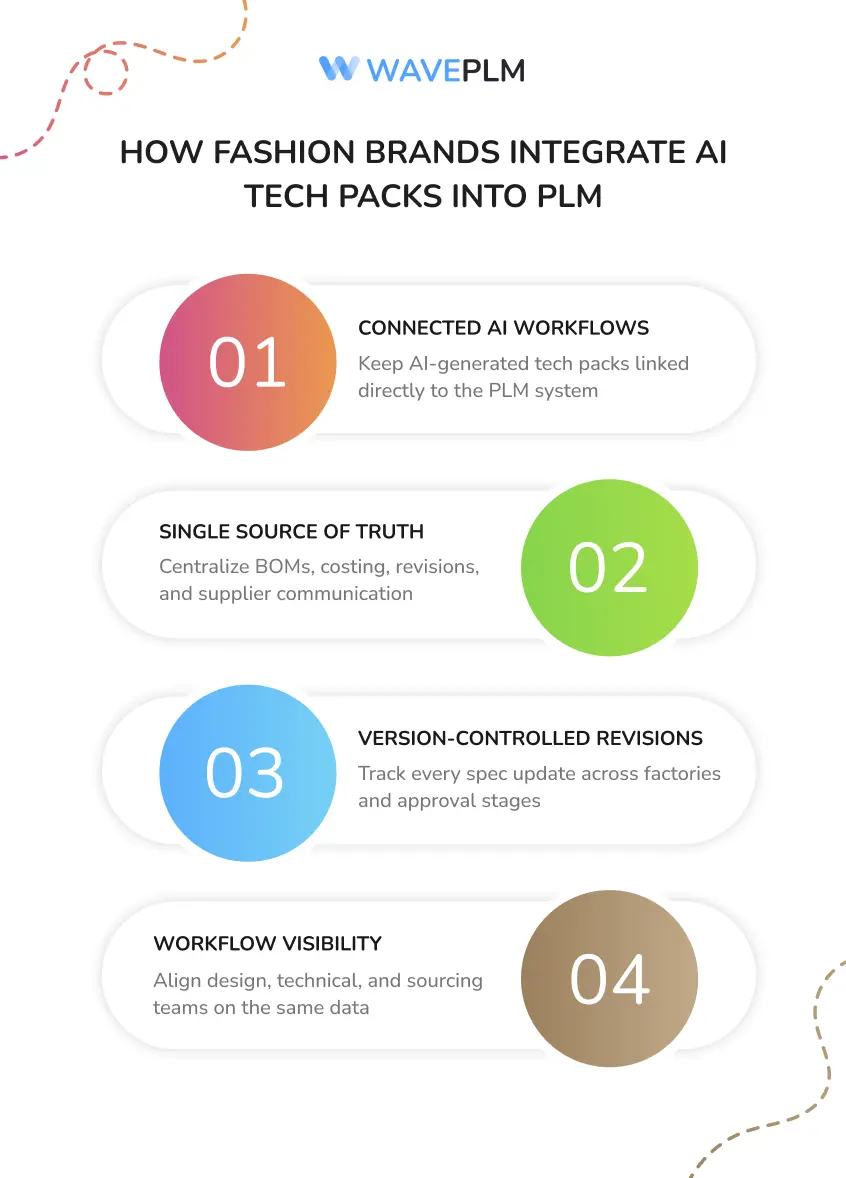
The most common failure mode for AI tech pack adoption isn’t the AI — it’s the workflow around it. Specifically, brands that adopt a standalone AI tech pack tool but keep it disconnected from their PLM system end up with two problems. First, version control confusion: which AI draft is current, and has it been updated since the factory received it? Second, data duplication: measurements stored in the AI tool and again in the PLM gradually diverge. Consequently, teams lose the single source of truth that makes the AI investment worthwhile.
The more effective approach connects AI-assisted creation directly inside the PLM environment. In that setup, the AI tech pack lives within the style record. It links to the BOM and costing sheet, and version-controls alongside sample approvals and supplier communications. As a result, designers, technical designers, and sourcing all work from a single source of truth — not emailing PDF drafts back and forth.
Furthermore, integrating the AI tech pack into a PLM workflow changes how revisions work. When the factory flags a measurement question, that change tracks against the specific version they’re working from. In other words, the factory knows they have version 3.2. The technical designer knows what changed between 3.1 and 3.2. Additionally, the sourcing manager can see that a human signed off on the revision before the next sample was ordered. For a deeper look at how tech packs connect to the broader document ecosystem, see our guide on fashion reports: tech packs, BOMs, and spec sheets explained.
What Should You Look for When Evaluating an AI Tech Pack Tool?
The market for AI tech pack features has grown quickly, and not all implementations are equally mature. Specifically, here are the criteria worth evaluating before committing to a tool or platform:
| Evaluation Criterion | What to Look For | Red Flag |
|---|---|---|
| Historical data integration | AI suggestions improve over time as you add more styles — the tool learns from your data, not generic fashion data | Suggestions based solely on generic industry templates with no adaptation to your library |
| Version control | Every AI-generated or human-edited version is tracked, timestamped, and attributable | No version history; files exported as static PDFs with no link back to the source |
| PLM connectivity | AI tech pack connects to BOM, costing, and sample records without manual re-entry | Standalone tool requiring export/import to connect with other systems |
| Approval workflow | AI-generated sections can be flagged for required human review before the document is marked factory-ready | No review gating — AI output goes directly to factory-ready status without sign-off |
| Measurement accuracy tracking | System records when AI-suggested values were accepted vs. overridden, so you can assess suggestion quality over time | No feedback loop — the tool has no way to learn from corrections |
Additionally, it’s worth asking any vendor for real customer examples — specifically, brands at your scale using the AI tech pack feature for your product category. A tool optimized for basics and T-shirts will perform very differently on tailored outerwear or technical activewear. Similarly, a platform built for large enterprise brands may have AI features calibrated to large historical datasets that a 50-style brand doesn’t have.
How Does Wave PLM Approach AI Tech Pack Creation?
In Wave PLM, AI tech pack assistance lives inside the style record rather than in a separate tool. Specifically, when you create a new style, the system identifies the closest historical matches in your library. It then pre-populates standard fields — measurements, BOM structure, care label suggestions, and compliance callouts — based on those matches. Furthermore, the interface visually flags each AI-suggested field, so technical designers see at a glance which values AI supplied and which a human authored.
Moreover, the PLM record tracks all tech pack versions and links them to sample approvals, supplier records, and purchase orders. As a result, when a factory questions a specific measurement, the answer is one click away. No digging through email threads from two months ago. Additionally, the system includes an AI learning loop. Every time a technical designer overrides a suggestion, it notes the correction. Future suggestions for similar styles improve as a result.
If you’re evaluating AI tech pack tools for your next season, see how Wave PLM handles AI-assisted tech pack creation within a connected product development workflow.

Frequently Asked Questions
Can AI generate a complete tech pack automatically?
Not reliably — not yet. AI tech pack tools in 2026 can auto-populate standard fields, suggest grading increments, flag missing measurements, and translate technical terminology. However, critical construction details, material specifications, and factory-specific tolerances still require review by a technical designer before the document is ready for factory submission. Fully automated tech packs remain a future capability, not a current production reality.
What parts of a tech pack can AI fill in automatically?
AI can reliably handle template population from historical data, grading suggestions, terminology translation, and version change summaries. Care label suggestions from fiber content also work well. In contrast, measurement values, material callouts, and construction notes require human input and sign-off. AI fills the repetitive structure; technical judgment remains human.
What is the difference between an AI tech pack tool and PLM software?
An AI tech pack tool typically focuses on document generation — drafting, auto-populating, and exporting the tech pack file. PLM software manages the full product lifecycle: connecting the tech pack to the BOM, costing sheet, sample approvals, supplier records, and production timeline. The most capable platforms in 2026 combine both — AI-assisted creation within a connected PLM workflow.
How much time does an AI tech pack tool save?
Early adopters report cutting first-draft creation time by 40–70%, based on vendor case studies published in 2024–2025. Specifically, time savings are highest for reorder styles and seasonal carry-forwards, where historical data allows AI to pre-populate most fields. New, complex styles with novel construction require more human input and consequently see smaller initial gains — though the measurement-flagging and version-summary features still save meaningful review time.
Do factories accept AI-generated tech packs?
Factories care about accuracy and completeness, not how the document was created. An AI tech pack that a technical designer has reviewed and approved is factory-ready. Problems arise when brands send AI-generated drafts without QA review — factories then receive incomplete measurement charts or missing construction callouts. As a result, the production rule is simple: AI drafts, human approves, factory receives.
The Right Way to Think About AI Tech Pack Adoption
An AI tech pack isn’t a replacement for technical design expertise — it’s an amplifier of it. Specifically, the brands getting the most value from AI are those with strong technical standards already in place: clean historical data, consistent templates, and clear review protocols. AI makes that structure faster. It doesn’t substitute for the structure itself.
In contrast, brands that adopt AI tech pack tools hoping to reduce headcount in technical design tend to find that errors increase rather than decrease. The reason is simple: the human review step was what kept those errors out of the process. As a result, the most sustainable adoption path is clear: use AI for the repetitive, pattern-based work it handles well. Then invest the time savings in better technical review of the construction details that determine whether a garment is factory-ready.
For next steps, see how AI tech pack creation connects to the broader spec sheet and digital specification workflow, and our guide on the garment costing process that typically follows tech pack approval.




Leave a Reply