

PLM and ERP integration connects product lifecycle management with enterprise resource planning systems, ensuring that product data like styles, BOMs, and costs flow automatically into financial, inventory, and order management records. This means a fabric change approved in PLM will update the cost sheet in ERP without any manual entry. For apparel brands, effective PLM and ERP integration distinguishes between having a single source of truth and managing two systems that may diverge.
Specifically, this guide walks through what actually needs to connect, a step-by-step integration process, and the mistakes that most commonly derail the project. Additionally, it covers where a fashion-specific PLM changes the calculus compared to the generic manufacturing playbook that dominates most integration content online.
This guide outlines the critical steps for executing a successful PLM and ERP integration project, including common pitfalls and best practices.
Understanding PLM and ERP integration is key for ensuring that product data and operational data are synchronized, which is vital for maintaining accuracy.
The process of PLM and ERP integration involves aligning product-side data, such as BOMs, with operations-side data to create a cohesive workflow.
What Is PLM and ERP Integration?
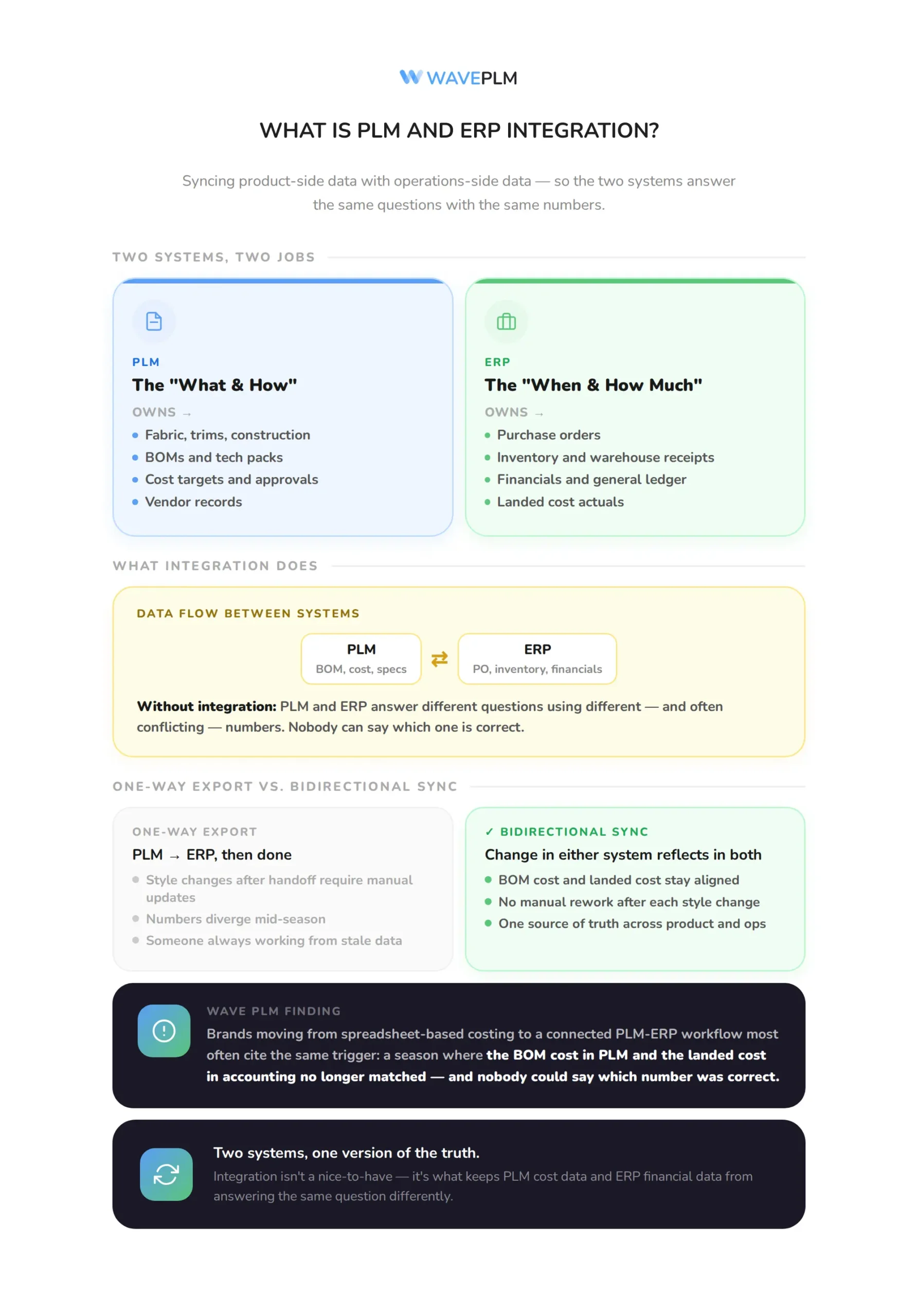
PLM and ERP integration is the technical and process work of syncing product-side data, such as styles, BOMs, tech packs, and vendor records, with operations-side data, such as purchase orders, inventory, and financials. PLM owns the “what and how” of a product: fabric, trims, construction, cost target, and approvals. ERP owns the “when and how much”: purchase orders, warehouse receipts, and the general ledger. Without integration, these two systems answer different questions using different, and often conflicting, numbers. For a closer look at what separates the two systems conceptually, see our full breakdown of PLM vs ERP for fashion brands.
Industry insights reveal that strong PLM and ERP integration hinges on bidirectional data exchange, ensuring changes in one system reflect in the other.
Notably, that distinction between one-way and two-way sync matters more than it sounds. Specifically, a one-way export from PLM to ERP still leaves someone updating spreadsheets by hand whenever a style changes after the initial handoff, which is exactly the point where fashion brands lose control of their numbers.
Brands utilizing PLM and ERP integration report improved accuracy in product costing and financial tracking.
By implementing a seamless PLM and ERP integration, fashion brands can reduce the risks associated with data discrepancies. A well-planned PLM and ERP integration process enhances the efficiency of handling product changes throughout the season.
In an industry characterized by rapid changes, effective PLM and ERP integration is crucial for maintaining competitive advantage. To achieve operational excellence, brands must focus on optimizing their PLM and ERP integration practices.
Assessing the impact of PLM and ERP integration on your workflow can lead to significant improvements in efficiency and accuracy.
Strategic PLM and ERP integration supports both product development and financial management, aligning teams around shared goals. Fostering a culture that embraces PLM and ERP integration can lead to long-term success in the fashion industry.
While integrating PLM and ERP integration, brands must also prioritize training team members to ensure smooth operations. The changing landscape of fashion demands that businesses prioritize PLM and ERP integration as part of their core strategy.
Industry data: According to CIMdata, a longstanding PLM industry analyst firm, robust integration between PLM and enterprise systems depends on bidirectional data exchange rather than one-way exports, so that a change made in either system is reflected in the other without manual rework.
Key to a successful PLM and ERP integration is recognizing the flow of data between systems to avoid manual data entry and errors. With clear objectives in mind, a successful PLM and ERP integration can streamline operations and enhance profitability.
Each phase of PLM and ERP integration should be carefully monitored to ensure alignment with business goals. Brands that effectively execute PLM and ERP integration can better manage their resources and reduce operational risks.
When implemented correctly, PLM and ERP integration enhances visibility across the entire production process. Ongoing evaluation of PLM and ERP integration practices can highlight areas for improvement and innovation.
For fashion brands, the importance of PLM and ERP integration cannot be overstated, as it helps navigate the complexities of the industry. To summarize, mastering PLM and ERP integration is essential for achieving operational excellence and driving growth.
Our finding: Wave PLM customers moving from spreadsheet-based costing to a connected PLM-ERP workflow most often cite the same trigger: a season where the BOM cost in PLM and the landed cost in accounting no longer matched, and nobody could say which number was correct.
Why Do Fashion Brands Need PLM and ERP Integration?
Fashion brands that prioritize PLM and ERP integration position themselves for success in a rapidly evolving market.
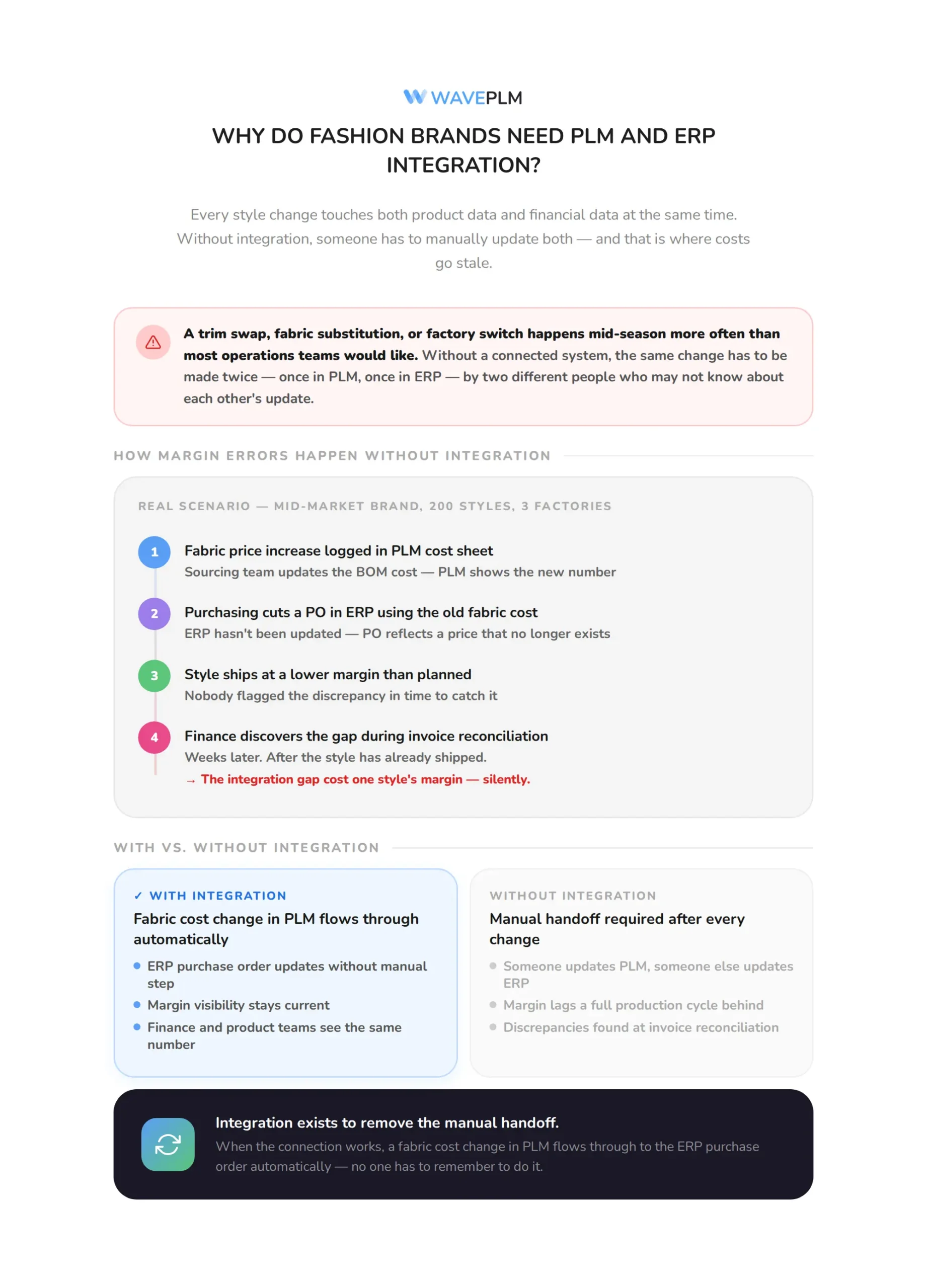
Fashion brands run on constant style changes. A trim swap, a fabric substitution, or a factory switch happens mid-season more often than most operations teams would like. Consequently, every one of those changes touches both product data and financial data at the same time. If PLM and ERP are not connected, someone has to manually update both, and that manual step is where costs go stale.
Consider a mid-market brand running 200 styles a season across three factories. A fabric price increase gets logged in the PLM cost sheet. Meanwhile, purchasing has already cut a PO in the ERP system using the old fabric cost. Unless someone flags the change and manually updates the PO, the brand ships that style at a lower margin than planned, and finance does not find out until the invoice reconciles weeks later.
Reduce this to its simplest form: PLM-ERP integration exists to remove that manual handoff. When the connection works, a fabric cost change in PLM flows through to the ERP purchase order automatically, and margin visibility stays current instead of lagging a full production cycle behind. If you have not yet selected an ERP platform, our fashion ERP software buyer’s guide covers what apparel-specific ERP evaluation should prioritize before integration even enters the conversation.
What Data Should Flow Between PLM and ERP?
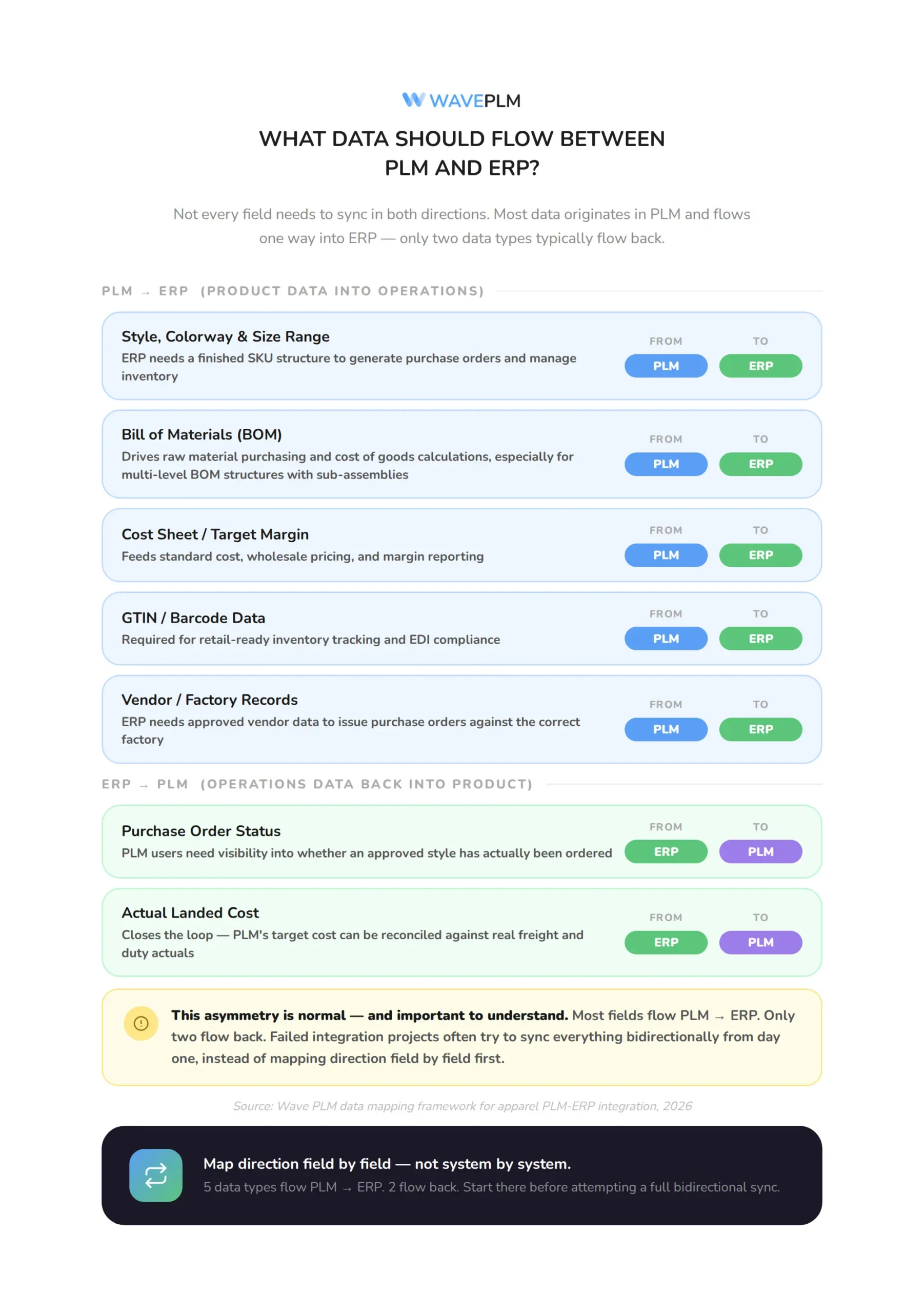
Not every field needs to sync in both directions. Some data originates in PLM and flows one way into ERP. Other data originates in ERP and flows back into PLM. The table below maps the most common data types for apparel brands specifically, rather than the generic manufacturing list most integration guides use.
| Data type | Originates in | Flows to | Why it matters |
|---|---|---|---|
| Style, colorway, size range | PLM | ERP | ERP needs a finished SKU structure to generate purchase orders and manage inventory |
| Bill of materials (BOM) | PLM | ERP | Drives raw material purchasing and cost of goods calculations, especially for multi-level BOM structures with sub-assemblies |
| Cost sheet / target margin | PLM | ERP | Feeds standard cost, wholesale pricing, and margin reporting; see our garment costing guide for how this sheet is built |
| GTIN / barcode data | PLM | ERP | Required for retail-ready inventory tracking and EDI compliance; see our GS1 and GTIN guide |
| Vendor / factory records | PLM | ERP | ERP needs approved vendor data to issue purchase orders against the correct factory |
| Purchase order status | ERP | PLM | PLM users need visibility into whether an approved style has actually been ordered |
| Actual landed cost | ERP | PLM | Closes the loop so PLM’s target cost can be reconciled against real freight and duty; see our landed cost calculation guide |
Notice that most fields flow one direction, from PLM into ERP. Only purchase order status and actual landed cost typically flow back. This asymmetry is normal. Even so, it explains why so many failed integration projects try to sync everything bidirectionally from day one, instead of mapping direction field by field first.
How Do You Integrate PLM and ERP Step by Step?
The process below reflects how apparel brands, specifically, typically approach this project. As a result, it differs from discrete manufacturing integration guides, which assume a single-plant, engineering-led environment rather than a multi-factory, seasonal product cycle.
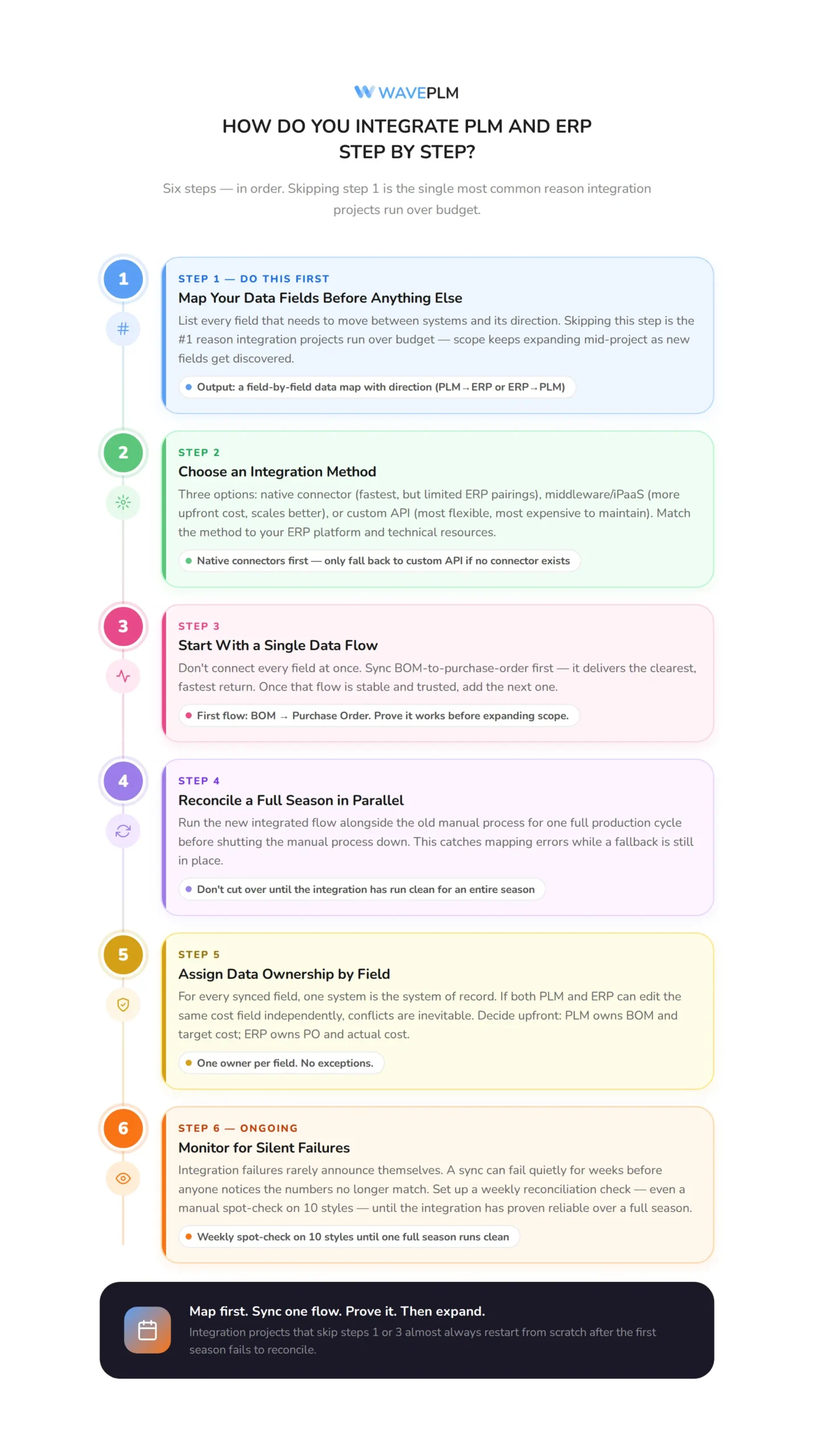
1. Map Your Data Fields First
Before evaluating any middleware or connector, list every field that needs to move between systems and its direction, similar to the table above. Notably, skipping this step is the single most common reason integration projects run over budget, because scope keeps expanding mid-project as new fields get discovered.
2. Choose an Integration Method
Most fashion brands pick from three approaches: a native connector built by the PLM or ERP vendor, a middleware platform such as an iPaaS tool, or a custom API integration built by an internal or contracted developer. However, native connectors are fastest to deploy but only exist for specific ERP pairings. In contrast, middleware costs more upfront but scales better across multiple systems. Meanwhile, custom API work is the most flexible, and also the most expensive to maintain over time.
3. Start With a Single Data Flow
Rather than connecting every field at once, sync one flow first, typically BOM-to-purchase-order, since it delivers the clearest and fastest return. Then, once that flow is stable, add the next one.
4. Reconcile a Full Season in Parallel
Run the new integrated flow alongside the old manual process for one full production cycle before shutting the manual process down. Importantly, this step catches mapping errors while there is still a manual fallback in place.
5. Assign Data Ownership by Field
For every synced field, one system should be the system of record. If both PLM and ERP can edit the same cost field independently, conflicts are inevitable. Instead, decide upfront: PLM owns the BOM and target cost, ERP owns the purchase order and actual cost.
6. Monitor for Silent Failures
Integration failures rarely announce themselves. A sync can fail quietly for weeks before anyone notices the numbers no longer match. For this reason, set up a simple weekly reconciliation check, even a manual spot-check on ten styles, until the integration has proven reliable over a full season.
What Mistakes Do Fashion Brands Make During PLM-ERP Integration?
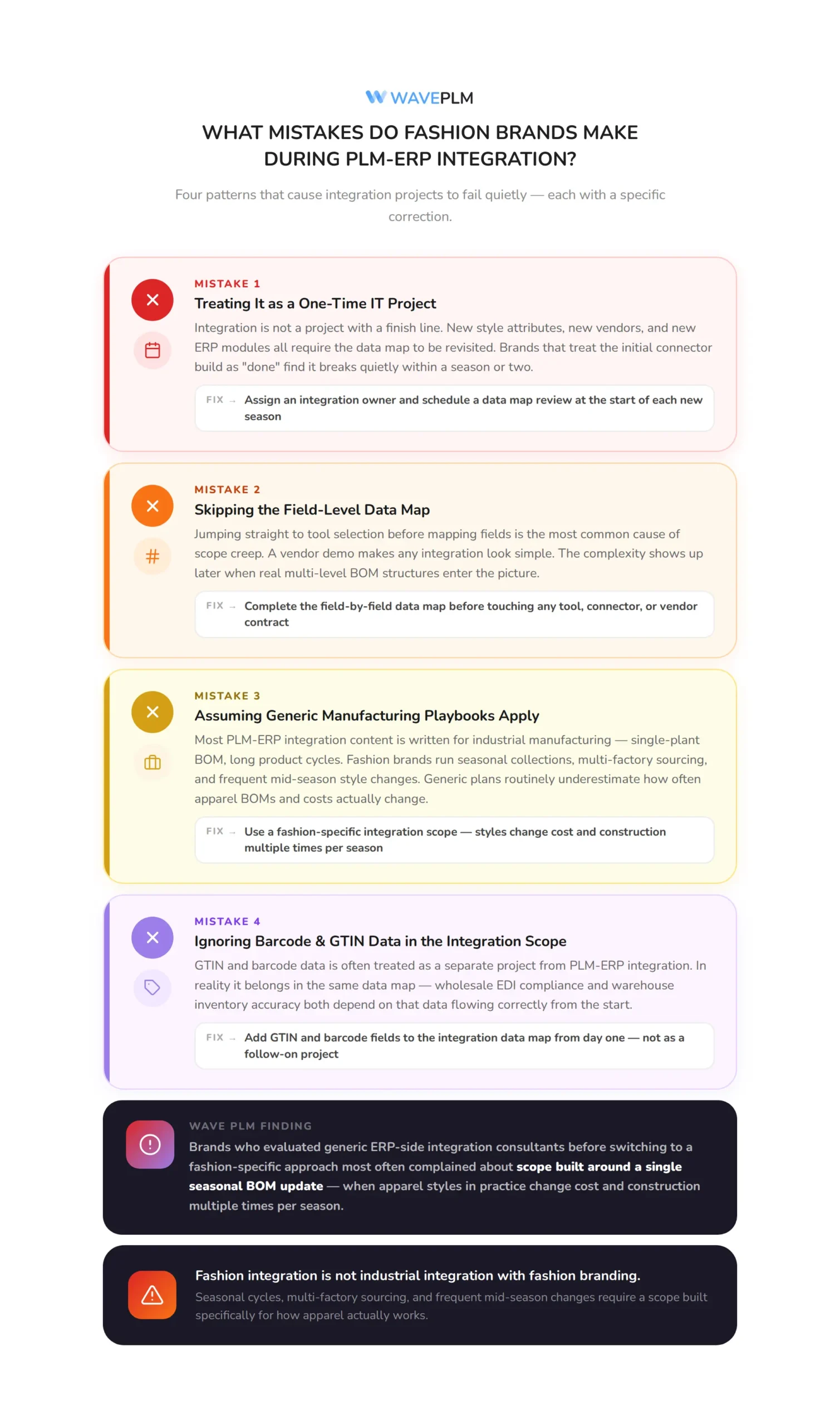
Treating It as a One-Time IT Project
Integration is not a project with a finish line. New style attributes, new vendors, and new ERP modules all require the data map to be revisited. Consequently, brands that treat the initial connector build as “done” find it breaks quietly within a season or two.
Skipping the Field-Level Data Map
As mentioned above, jumping straight to tool selection before mapping fields is the most common cause of scope creep. A vendor demo makes any integration look simple. However, the complexity shows up later, once real BOM structures and multi-level components enter the picture.
Assuming Generic Manufacturing Integration Playbooks Apply
Most PLM-ERP integration content online is written for industrial and electronics manufacturing, where a single-plant BOM structure and long product cycles are the norm. Fashion brands instead run seasonal collections, multi-factory sourcing, and frequent mid-season style changes. As a result, a generic integration plan built for automotive or electronics manufacturing routinely underestimates how often apparel BOMs and costs actually change.
Our finding: Among Wave PLM customers who evaluated generic ERP-side integration consultants before switching to a fashion-specific approach, the most common complaint was scope built around a single seasonal BOM update, when apparel styles in practice change cost and construction multiple times per season.
Ignoring Barcode and GTIN Data in the Integration Scope
Retail-ready GTIN and barcode data is often treated as a separate project from PLM-ERP integration. In reality, it belongs in the same data map, since both wholesale EDI compliance and warehouse inventory accuracy depend on that data flowing correctly between systems from the start.
How Does Wave PLM Support ERP Integration?
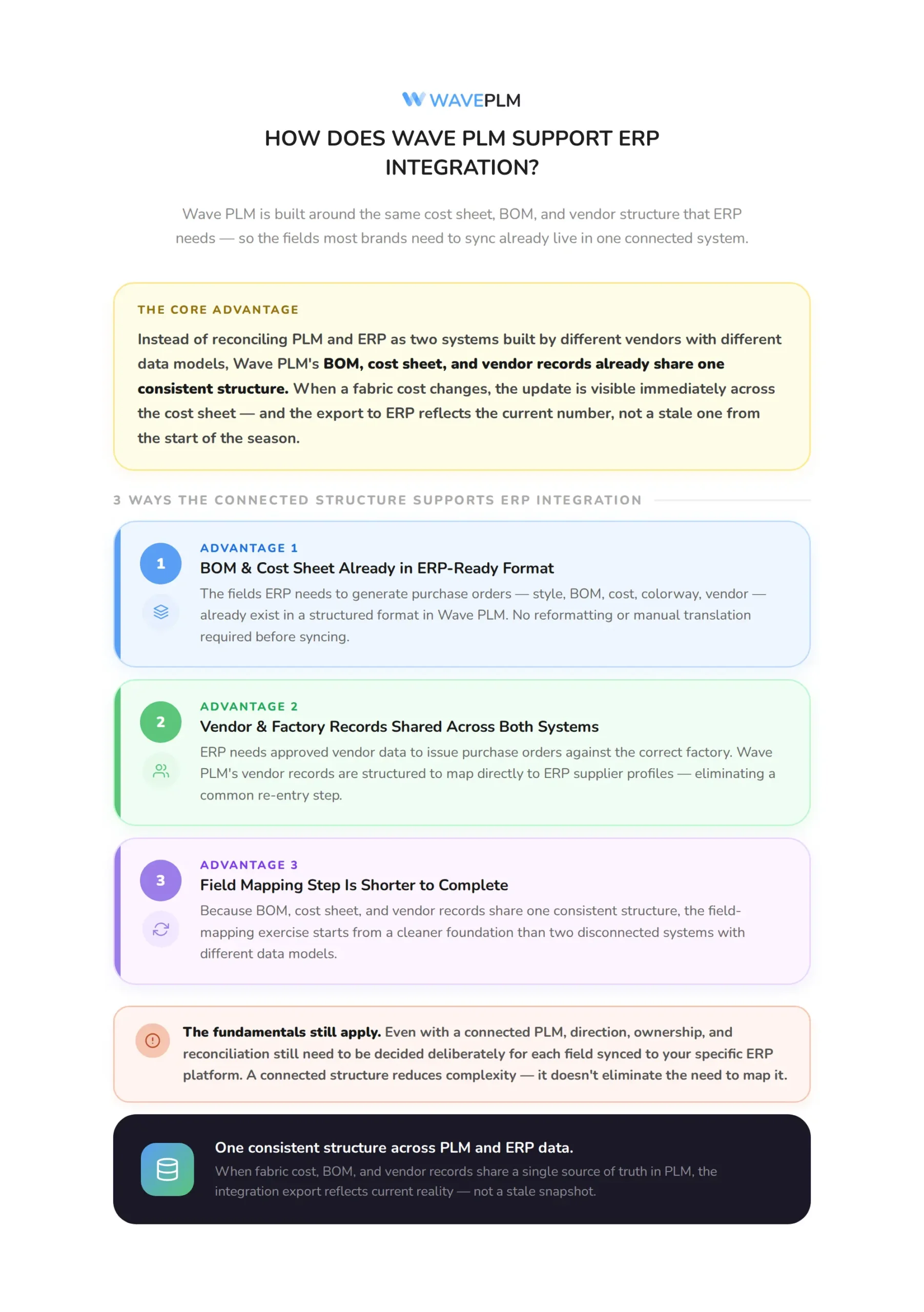
Wave PLM is built around the same cost sheet, BOM, and vendor structure used across garment costing, fabric sourcing, and landed cost tracking. As a result, the fields most apparel brands need to sync with ERP already live in one connected system rather than scattered across disconnected modules. When a fabric cost changes, that update is visible immediately across the cost sheet, and the export to ERP reflects the current number rather than a stale one from the start of the season.
For brands early in the process, this connected structure also simplifies the field-mapping step described above. Instead of reconciling PLM and ERP as two separate systems built by different vendors with different data models, the BOM, cost sheet, and vendor records already share one consistent structure, including the vendor and factory records that ERP needs to issue purchase orders correctly. That said, the fundamentals still apply. Even with a connected PLM, direction, ownership, and reconciliation still need to be decided deliberately for each field synced to your specific ERP platform. Teams rolling out this connection for the first time can pair it with our PLM implementation timeline to sequence integration work alongside the broader rollout.
Frequently Asked Questions
What is PLM and ERP integration?
PLM and ERP integration is the process of connecting a product lifecycle management system to an enterprise resource planning system so that product data, such as styles, BOMs, and costs, flows automatically into financial, inventory, and purchasing records instead of being re-entered by hand.
Is PLM the same as ERP?
No. PLM manages product development: styles, BOMs, tech packs, and vendor approvals. In contrast, ERP manages business operations: purchase orders, inventory, and financials. Consequently, the two systems answer different questions, which is exactly why they need to be integrated rather than treated as interchangeable.
What data typically flows from PLM to ERP?
Style and colorway data, bills of materials, cost sheets, GTIN and barcode data, and vendor records typically originate in PLM and flow into ERP. Purchase order status and actual landed cost typically flow the other direction, from ERP back into PLM.
How long does PLM-ERP integration take for a fashion brand?
Timelines vary by integration method and scope, but starting with a single data flow, such as BOM-to-purchase-order, and reconciling it across one full production season before adding the next flow, is a more reliable path than attempting to sync every field at once.
What is the biggest mistake brands make when integrating PLM and ERP?
Skipping a field-level data map before selecting an integration tool is the most common mistake. Without it, scope expands mid-project as new BOM attributes and vendor fields surface that were never accounted for in the original plan.
Do I need custom development to integrate PLM and ERP?
Not always. In many cases, native connectors between specific PLM and ERP pairings can cover common needs without custom work. However, middleware platforms and custom API development become necessary mainly when connecting less common system pairings or highly specific workflows.
PLM and ERP integration is ultimately about deciding, field by field, which system owns the truth and making sure updates flow without manual rework. Fashion brands that skip the data-mapping step, or borrow a generic manufacturing integration plan, tend to rediscover the same gaps a season later: stale costs, mismatched purchase orders, and a reconciliation headache at month-end.
Wave PLM keeps the BOM, cost sheet, and vendor data that ERP needs in one connected structure from the start. See how Wave PLM simplifies ERP integration →






Leave a Reply